
"Search Google or type a URL" is the hint text inside Google Chrome's search box on the New Tab page and in the address bar. It tells you the box does two jobs. Type a few words and press Enter, and Chrome searches Google for them. Type a web address such as wikipedia.org, and Chrome goes straight to that site. You don't have to pick a mode first; Chrome works out which one you meant.
This guide explains what the prompt means, when searching is better than typing the address, how Chrome decides between the two, why some phones and newer Chrome versions show different wording, and how to change the search engine the box uses.
What "Search Google or type a URL" means
Older browsers had two boxes: an address bar for web addresses and a separate search box. Chrome merged them into one field in 2008 and called it the omnibox. Because the single box does both jobs, Chrome puts a short hint inside it so new users know they can type either thing.
The wording is not a guess or a translation of the idea; it is the exact text in Chrome's source code. In the Chromium project, the New Tab page search box uses a string that reads "Search Google or type a URL" when Google is the default search engine. The desktop address bar uses "Search [your search engine] or type a URL", so if you switched to Bing, the hint changes to "Search Bing or type a URL".
So the prompt tells you three things:
- "Search Google": anything you type that isn't a web address becomes a Google search.
- "or type a URL": a URL (Uniform Resource Locator) is a web address like https://www.bbc.com or just bbc.com.
- The engine name: the word in the middle is whatever search engine Chrome is set to use.
Searching vs typing a URL, with examples
Here is what happens with a few typical inputs in the same box.
| What you type | What Chrome does | Why |
|---|---|---|
| weather tomorrow | Searches Google | Has a space and no domain ending |
| amazon.com | Opens Amazon | Looks like a domain (.com) |
| amazon | Searches Google for "amazon" | A single word with no domain ending |
| https://www.irs.gov/refunds | Opens that exact page | Full address with https:// |
| 192.168.1.1 | Opens your router's admin page | An IP address is treated as a location |
| how to boil an egg? | Searches Google | A question, not an address |
Most people search for sites they already know. Typing "amazon" and clicking the first result gets you to the same place as typing amazon.com, it just adds a step through a results page.
When to search and when to type the address
Type the URL when
- You know the exact address. It's one step instead of two, and you skip ads on the results page that can sit above the real site.
- You're going to your bank, email or tax account. Typing the address you know (or using a bookmark) avoids fake sites that buy ads on brand names.
- You want a specific page. An address like support.google.com/chrome takes you to the right section directly.
- You're on a local network. Router pages, printers and company intranets often don't appear in Google at all.
Search Google when
- You don't know the address. Guessing a domain can land you on a parked page or a lookalike site.
- You want to compare options. "Best budget laptop" gives you many sources to weigh.
- You need a quick answer. Time zones, unit conversions, sports scores and definitions often appear on the results page itself.
- You're not sure of the spelling. Google corrects typos; a mistyped address just fails or goes somewhere wrong.
A simple rule: type the address for places you already trust, search for everything else.
How Chrome decides whether you searched or typed a URL
Chrome looks at the text as you type and classifies it. It doesn't read your mind; it checks for things that look like a location.
- A scheme at the start, like https:// or http://, means a URL.
- A known domain ending, such as .com, .org, .co.uk or .io, with no spaces, usually means a URL.
- An IP address or a port number (like localhost:3000) means a URL.
- Spaces, question words or plain words mean a search.
- Your history counts. If you've visited a site before, Chrome suggests it in the dropdown as you type, so a few letters can be enough.
Two tricks help when Chrome guesses wrong:
- To force a search for something that looks like a web address (say you want to read about "notion.so" rather than open it), type a question mark and a space first: ? notion.so.
- To force a URL for a single word on an internal network, add a slash at the end: intranet/.
Pressing Enter picks the top line in the dropdown. Use the arrow keys to pick a different suggestion before you press it.
"Search or type web address", "Ask Google or type a URL" and other versions
The prompt reads a little differently depending on your device, browser and Chrome version. They all mean the same thing: the box accepts a search or an address.
| Where you see it | Hint text |
|---|---|
| Chrome New Tab page (desktop) | Search Google or type a URL |
| Chrome address bar (desktop) | Search Google or type a URL (engine name changes if you switch) |
| Chrome with AI features turned on | Ask Google or type a URL |
| Chrome on Android and iPhone | Search Google or type URL, or Search or type URL |
| Older Chrome on Android | Search or type web address |
| Firefox | Search or enter address |
| Microsoft Edge | Search or enter web address |
| Safari | Search or enter website name |
What "Ask Google or type a URL" means
Chrome's source code now includes "Ask Google or type a URL" as a New Tab page placeholder, alongside rotating hints such as "Ask Google", "Make a plan" and "Compare options". This version shows up where Google's AI Mode is built into Chrome. You can still type a normal search or an address. The difference is that you can also type a full question and send it to AI Mode, which answers in a conversation instead of a list of links.
On desktop, Google's help page says you open AI Mode from the address bar by selecting the AI Mode button on the right or pressing Tab then Enter. If you don't want the button, right-click the address bar and unselect "Always show AI Mode". Google also notes that AI Mode in Chrome isn't available to everyone or on every device yet.
What "search or enter address" means
This is Firefox's version of the same prompt, taken from Firefox's own interface text. Edge uses "Search or enter web address" and Safari uses "Search or enter website name". Every modern browser works the same way: one box, search or address.
Why the prompt appears on Android
On Android the prompt shows up in more places than on a computer, which is why many people first notice it on a phone:
- Chrome's start page. When you open a new tab, the search box at the top of Chrome's home screen shows the hint.
- The address bar at the top (or bottom) of Chrome. Tap it and the hint appears until you start typing.
- Chrome's quick search widget. If you've added Chrome's search widget to your home screen, its box reads "Search or type URL".
- After an update. Chrome updates itself through the Play Store, and new versions sometimes change the wording, which makes an old prompt suddenly look new.
It isn't a notification, an error or a virus. It's placeholder text that disappears as soon as you type. If a pop-up or a full-screen page uses this wording and asks you to install something or enter a password, that is not Chrome; close the tab.
How to change the default search engine in Chrome
If you'd rather "Search Bing", "Search DuckDuckGo" or another engine from the same box, change Chrome's default search engine. These steps come from Google's Chrome Help page. If you are still deciding which one to use, our comparison of alternative search engines to Google covers 15 options.
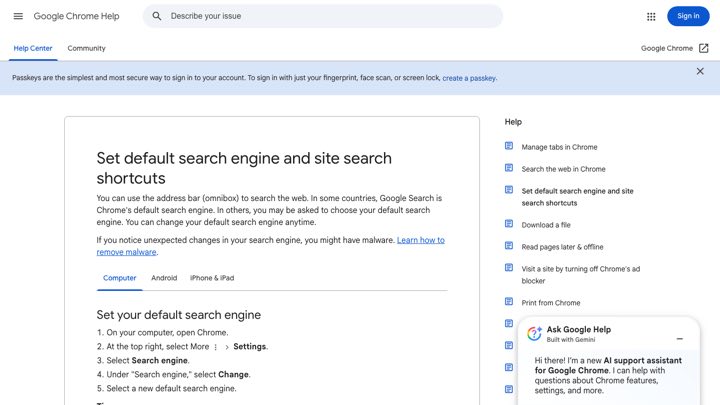
On a computer (Windows, Mac, Chromebook)
- Open Chrome.
- At the top right, select More (the three dots), then Settings.
- Select Search engine.
- Under "Search engine", select Change.
- Select a new default search engine.
On Android
- Open Chrome.
- Tap More (the three dots) at the top right, then Settings.
- Under "Basics", tap Search engine.
- Choose the search engine you want.
On iPhone and iPad
- Open the Chrome app.
- Tap More (the three dots), then Settings.
- Tap Search engine.
- Choose the search engine you want.
On phones, Google notes that search engines you've recently visited are added to the list as options. In some countries Chrome asks you to choose a search engine when you first set it up, so your default may not be Google at all.
If the setting won't stick: when your search engine keeps switching back to one you never chose, Google warns that you may have malware or an unwanted extension. Check your extensions, then use Chrome's reset settings option. On a work or school device, your administrator may control the search engine, and you won't be able to change it.
Address bar shortcuts most people never use
The same box can search more than the web. Chrome has built-in shortcuts that start with @:
- @tabs searches your open tabs, handy when you have 40 of them.
- @bookmarks searches your saved bookmarks.
- @history searches pages you've visited.
- @aimode, where available, sends your question to Google's AI Mode.
You can also add your own site search shortcuts. In Settings, go to Search engine, then Manage search engines and site search, and select Add next to "Site search". Give it a name, a shortcut such as wiki, and a URL with %s where the search words go. After that, typing wiki then Tab lets you search that site directly from the address bar. Google's help page adds that the tabs, bookmarks and history shortcuts can be edited or turned off but not deleted.
Privacy and safety notes
- What you type can be sent before you press Enter. To show suggestions, Chrome sends what you type in the address bar to your default search engine. You can turn this off in Chrome's settings under the option for autocomplete of searches and URLs, found in the Google services section.
- Typing a URL is not automatically more private. Your browser history, your internet provider and the site itself still see the visit. Use Incognito mode if you don't want the visit saved on your device, and remember it doesn't hide you from websites or your network.
- Typos can be risky. Scammers register lookalike domains of popular sites (for example, swapping two letters). If a site looks slightly off after you typed its address, check the spelling in the address bar.
- Search ads can mimic real brands. For banking and payments, use a bookmark or type the address you know, rather than clicking the first result.
- Look at the padlock and the domain. The part just before .com (or .org, .gov) is what matters. paypal.com.secure-login.net is not PayPal.
What this means if you run a website
Most people don't type full web addresses. They type a brand name, a product or a question into this box and pick from what comes up. That means the address bar sends people to search results for almost everything, including your own business name. If your site isn't the top result for your name, or doesn't show up for the questions your customers ask, people end up on a competitor, a directory, or a review site instead. And with "Ask Google" and AI Mode in the same box, being cited in AI answers matters as much as ranking in the blue links. Our guide on how to improve search engine rankings covers the basics, and Google Analytics, which is free, shows how much of your traffic arrives from search in the first place.
Distribb runs that work on autopilot. You connect your site, and it does the keyword research, writes and publishes articles, builds backlinks through its exchange network, and works on your visibility in AI search on its own. Pro is $97 a month; Accelerator is $495 a month and adds a human reviewing every piece. You can see what Distribb does for websites that want to be found.
FAQ
What does "Search Google or type a URL" mean?
It means the box in Chrome accepts either a search or a web address. Type words to search Google, or type an address like example.com to go straight to that website.
What does "search or type web address" mean?
It is the same prompt in older versions of Chrome on Android. The address bar searches if you type words and opens a website if you type its address.
What is "Ask Google or type a URL"?
It's a newer version of the prompt in Chrome, shown where Google's AI features are built in. You can still search or type an address, and you can also ask a full question and get an answer from AI Mode.
What does "search or type URL" mean on my phone?
It is Chrome's shorter mobile wording, used in Chrome on Android and iPhone and in Chrome's home screen search widget. It works exactly like the desktop prompt.
What does "search or enter address" mean?
That's the Firefox version. Firefox's address bar, like Chrome's, takes a search or a web address in the same field.
Is it better to search Google or type a URL?
Type the URL when you know the exact address, especially for banking, email and government sites. Search when you don't know the address, want to compare options, or aren't sure of the spelling.
Is "Search Google or type a URL" a virus?
No. It's normal placeholder text built into Chrome. Be careful only if a pop-up uses similar wording to ask you to download something or sign in.
Can I remove "Search Google or type a URL" from Chrome?
The hint text itself can't be turned off; it disappears when you type. You can change the search engine it names in Settings, and on desktop you can hide the AI Mode button by right-clicking the address bar and unselecting "Always show AI Mode".
What is the URL for Google search?
Google's search page is google.com. A search results page follows the pattern google.com/search?q= followed by your search words.