

Wix is good enough for SEO, and that has been true for a few years now. Google can crawl a Wix site, the markup is clean enough, and the speed numbers are better than most people assume. If your Wix site gets no traffic, the platform is rarely the reason. The usual causes are thin pages, no links pointing at the site, and a handful of settings nobody opened.
This guide covers all of that. You get the settings to check, in the order that matters, the advanced controls Wix gives you, what each one requires on your plan, what a Wix SEO expert costs, and a checklist you can copy. Every setting path, price and limit below was checked against Wix's own pages in October 2026.
We analyzed 6 Wix SEO guides (Neil Patel, Ranktracker, WPShout, Intuitive Digital, Key-G, Digital Thrive) about wix seo and found that 0 of 6 state which plan or connected domain Wix SEO tools require. None gave a price for hiring help, and none covered AI search visibility in the body text.
Is Wix good for SEO in 2026?
Yes. The old reputation came from years when Wix sites were slow and hard for crawlers to read. That has changed, and the evidence is public.
- Rendering: Wix says its infrastructure is based on server-side rendering, so search engines get readable page content without running your site's JavaScript first.
- Speed: in HTTP Archive data reported by Search Engine Journal for November 2025, 74.86% of Wix sites passed Core Web Vitals. That put Wix second among the platforms compared, behind Duda and just ahead of Squarespace at 70.39%. WordPress came last in the same comparison.
- Crawling: Wix states that all site content can be crawled and indexed, whether or not the site is on a paid plan, and that its sites are open to AI crawlers as well.
- Tooling: robots.txt, canonicals, structured data, redirects and meta tags are all editable from the dashboard, with no plugins to install.
The honest limits are elsewhere. You work inside Wix's hosting, so you cannot change server settings the way you can on your own WordPress install. Moving away later means rebuilding the site, since Wix says a Wix site cannot be exported to another host. And Wix's tools only set the site up. Writing the pages and earning the links is still on you, and those two things decide most rankings.
What each Wix plan unlocks for SEO
Most Wix SEO guides skip this, and it is the first thing to settle. Your site can be indexed on the free plan, but several of the tools that protect and measure your rankings need a paid plan and a connected domain. These are the current prices, billed yearly, before tax.
| Plan | Price per month | Worth knowing for SEO |
|---|---|---|
| Free | $0 | Can be indexed, but no connected domain, so none of the domain-only tools below apply |
| Light | $17 | Lowest paid plan, 1 year free domain, 2 GB storage |
| Core | $29 | 50 GB storage, payments, basic ecommerce |
| Business | $39 | 100 GB storage, standard ecommerce |
| Business Elite | $159 | Unlimited storage, advanced ecommerce, advanced developer platform |
Three requirements come straight from Wix's help center:
- Google Search Console: connecting through the checklist needs a Premium plan and a connected domain.
- 301 redirects: they only work with custom domains. You cannot redirect from a free Wix URL to a Premium site.
- Custom code: your site must be published with a connected domain before you can add it.
So if rankings matter to you, buy the domain before you build links. A link earned to a free Wix address cannot be passed along by a redirect later.
The Wix SEO settings to check first
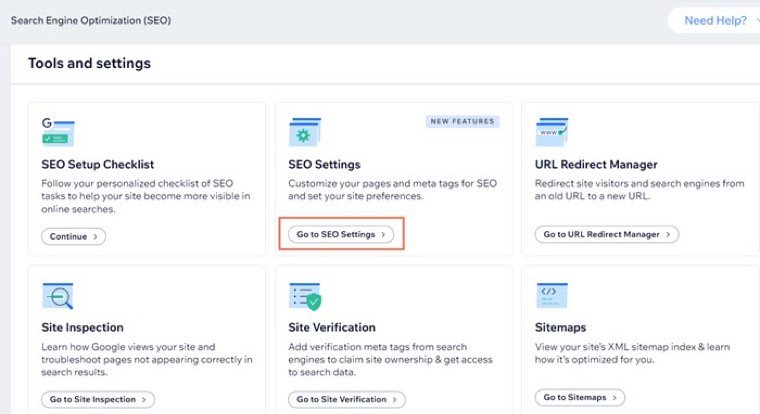
Almost everything lives in one place: SEO & GEO in your site's dashboard, then Tools and settings. Older guides call this area SEO Tools or SEO Wiz, so the menu names you see in tutorials may not match.
1. Run the SEO Setup Checklist
Start with the SEO Setup Checklist, which is what SEO Wiz turned into. You enter your business name, say whether you serve customers from a physical address or online, and add 3 keywords. Wix then builds a task list and walks you through connecting Google. Wix says its keyword research here is powered by Semrush.
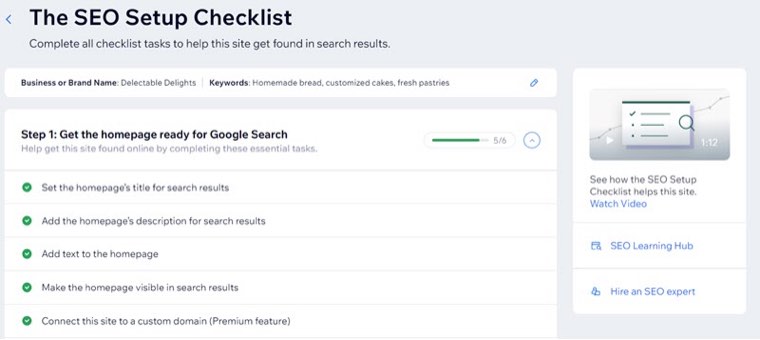
Treat it as a floor. Finishing every task tells you the site is set up, and that is all it tells you.
2. Confirm indexing is on
Under SEO Settings, check that Let search engines index your site is enabled. This one toggle hides the whole site if it is off. Then use Site Inspection, which ties into Search Console, to see how Google views your pages and which ones are not appearing.
3. Set rules by page type
SEO Settings lets you edit defaults per page type, such as main pages, products or blog posts, using static text or variables. The Wix default title tag is page name plus site name, which is fine for a contact page and weak for a service page. Set a sensible pattern here, then write the important pages by hand.
The Edit by Page tab lets you work through pages in bulk, which is the fastest way to spot duplicate titles or pages set to noindex by accident.
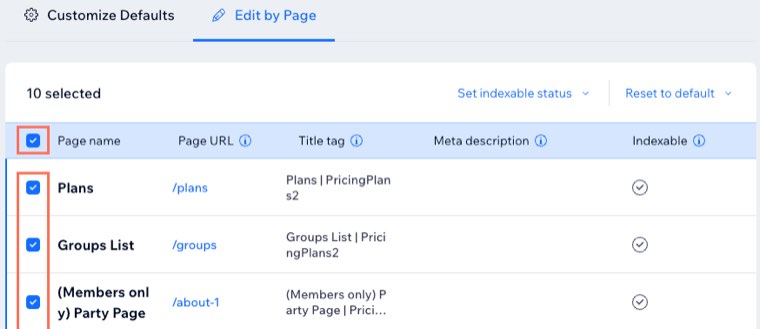
4. Fix titles, descriptions and URLs on your money pages
For each page that brings in leads or sales, open its SEO panel and work through three fields:
- Title tag: the service or product first, then the place if you are local, then your brand if there is room.
- URL slug: short and readable. Wix updates the sitemap, canonical and redirect for you when you change a slug, so a fix here is low risk.
- Meta description: Wix adds no variables here by default, because Google often writes its own snippet. Wix says an audit tool flagging an empty field is not a problem. Write one for your main pages anyway, since it is your best shot at the click.
5. Check sitemaps, robots.txt and social share
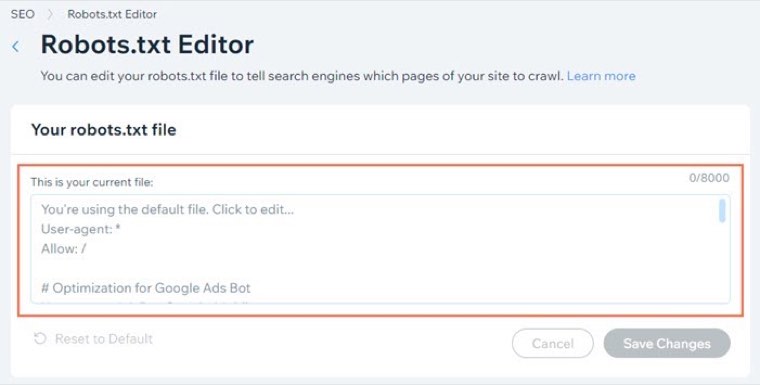
Wix creates and maintains your XML sitemap, so you normally have nothing to do except make sure it is submitted in Search Console. Your robots.txt file is at yourdomain.com/robots.txt, and by default it allows bots onto all of your pages. Leave it alone unless you have a specific reason. Set a social share image for your main pages so links do not appear blank when shared.
6. Connect your Google Business Profile if you are local
Wix lets you create or import your Business Profile and manage it from the dashboard, including reviews. Add your business name and location to your account too, because Wix then adds Local Business markup to your homepage automatically.
Wix advanced SEO: the controls most owners never open
Wix's defaults are fine for a small site. These controls matter once you have a lot of pages, a migration, or a technical problem. One warning first: Wix states that its Customer Care team cannot help with robots.txt changes or structured data changes. If you break one, fixing it is on you.
| Control | Where it is | When to touch it |
|---|---|---|
| URL Redirect Manager | SEO & GEO, Tools and settings | Moving to Wix, deleting pages, merging pages. Single URLs, groups by path, or a CSV of up to 500 URLs at once |
| Robots.txt Editor | SEO & GEO dashboard | Rarely. Blocking crawl of specific low-value paths |
| Canonical tags | Advanced SEO tab of the SEO panel | Several URLs reach the same page |
| Structured data | Advanced SEO tab, or SEO Settings by page type | Wix's automatic markup is missing something you need |
| Robots meta tags | SEO Settings, or the Advanced SEO tab | Noindex or nofollow on specific pages |
| Bot log reports | Wix Analytics reports | Google is ignoring pages and you want to see what it actually crawls |
| Custom code | Settings, Development & integrations | Verification tags and snippets. Not for tracking scripts |
| Velo SEO APIs | Developer tools | Changing meta tags or markup in code, across many pages |
Structured data
Wix adds markup to products, events, and blog and forum posts on its own. For blog posts you can turn on AI-generated markup under SEO Settings, Blog posts, Customize defaults. For anything else you paste JSON-LD into a custom markup field, and you can use variables so the same template works across pages of a type.
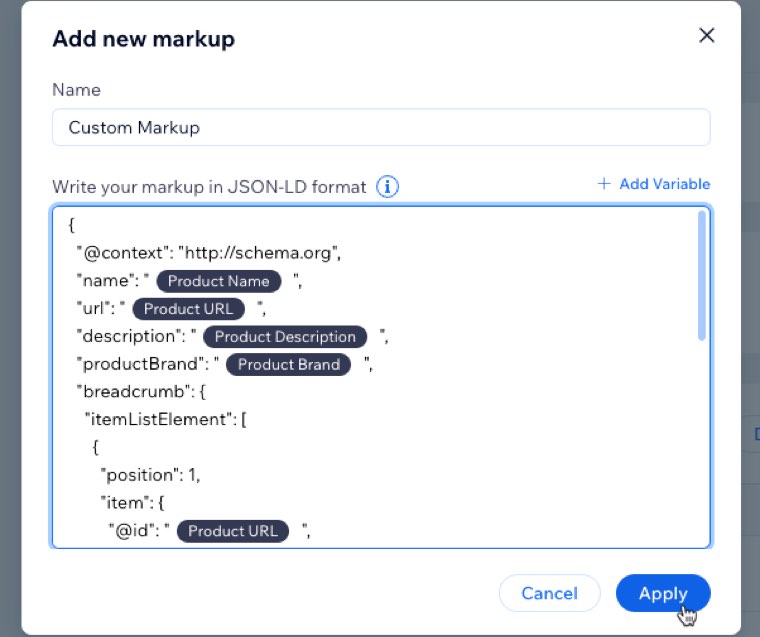
Test the result in Google's Rich Results Test. Wix is clear that markup does not guarantee rich results, and neither does Google.
Custom code and tracking
This trips people up. Wix says Google Analytics, Google Tag Manager and Facebook or TikTok pixels do not work through custom code. They go through marketing integrations instead. Our walkthrough of Wix and Google Tag Manager covers that setup.
Speed and images
Wix handles the CDN and caching, and it compresses images and converts larger ones to WebP on its own. What you control is the design. If a page scores badly in PageSpeed Insights, look for heavy galleries, autoplay video, animation on load, and third-party widgets. Add descriptive alt text as you upload, and check every important page on a real phone.
Migrating to Wix without losing rankings
Map every old URL to its new one before you switch the domain, import the list as a CSV into the URL Redirect Manager, and test a sample with a redirect checker afterward. Pages with links pointing at them matter most, because a missing redirect throws that value away.
Wix blog SEO and content
A Wix site with six pages can only rank for a small number of searches. Content is how you reach everything else your customers look up, and it is where nearly all Wix sites stop.
- Give every post one job. One search intent per post. Two posts chasing the same phrase compete with each other.
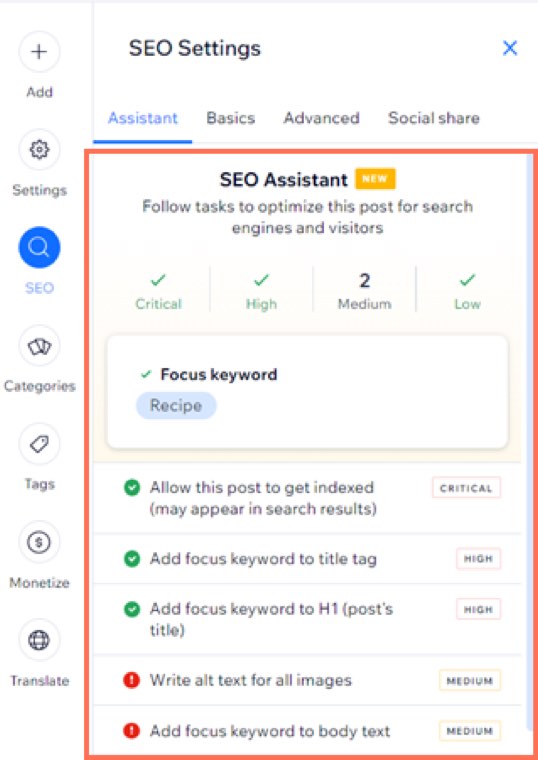
- Use the SEO Assistant. Inside Wix Blog posts, Stores products and Bookings services, the SEO Assistant takes a focus keyword and gives you a list of tasks ranked by importance. Follow the tasks that help the reader and skip any that make the copy worse.
- Link posts to pages that make money. Each post should link to the service or product it relates to.
- Keep publishing. Most of the benefit is cumulative. We cover the timelines in how long SEO takes to work.
One tip Wix itself gives: skip the meta keywords field. Wix's help center says Google does not use it for ranking, and many older tutorials still tell you to fill it in.
Links are the other half. Wix cannot help you here, and a good page with no links rarely reaches page one on a competitive term. See how many backlinks you need to rank for a way to size the gap against the sites above you.
Wix and AI search
Wix has renamed its SEO dashboard to SEO & GEO, GEO meaning generative engine optimization. Its AI Visibility tool shows how your site is mentioned in ChatGPT, Gemini, Perplexity and others, tracks AI-driven traffic, and shows which sources those tools rely on.
Tracking is useful, but it will not get you mentioned. AI answers tend to draw on pages that state things clearly and on brands other sites talk about. So write direct answers under clear headings, keep your business facts consistent everywhere, and earn mentions on the sites these tools cite. Our AI SEO guide goes deeper.
What Wix SEO costs
Wix's SEO tools come with the site, so the cost is your plan plus whatever you pay for content and links. We found no reliable survey of Wix-only rates, so the figures below are general SEO market rates from published provider surveys. Our breakdown of how much SEO costs has the full data.
| Option | Typical cost | Source |
|---|---|---|
| Do it yourself on Wix | From $17 a month for the plan, plus your time | Wix pricing |
| Freelancer, hourly | $50 to $100 an hour | Backlinko survey |
| Freelancer, monthly | $1,348 average | Ahrefs study |
| Agency, monthly | $3,209 average | Ahrefs study |
| One-off audit or migration | $500 to $5,000 per project | WebFX |
| Distribb on autopilot | $97 Pro, $495 Accelerator, per month | Our own pricing |
When you need a Wix SEO expert
A one-off specialist is worth paying for in a few cases: a migration onto Wix from a site that already ranks, a sudden traffic drop you cannot explain, or broken indexing that Search Console does not make clear. Wix runs its own Marketplace for hiring professionals, and its help center points people there for structured data work. Get more than one quote.
Settings work is small and finishes quickly. If someone offers an ongoing retainer to adjust Wix settings every month, ask what they will produce. What needs doing every month is content and links, and that is what you should be buying.
The Wix SEO checklist
Copy this table into a doc and work down it. The first block takes an afternoon. Before you start, run a general SEO audit checklist if your site already has traffic to protect.
| Task | Where | How often |
|---|---|---|
| Upgrade and connect a custom domain | Wix plans and Domains | Once |
| Complete the SEO Setup Checklist | SEO & GEO, Tools and settings | Once |
| Confirm site indexing is on | SEO Settings | Once, and after any redesign |
| Connect Google Search Console | SEO Setup Checklist | Once |
| Connect analytics and tags | Marketing integrations | Once |
| Set title patterns per page type | SEO Settings, Customize defaults | Once |
| Hand-write titles and descriptions for money pages | SEO panel | Each new page |
| Check URL slugs are short and readable | SEO panel | Each new page |
| Add alt text to meaningful images | Editor, image settings | Each new image |
| Set social share images | SEO panel, Social share | Each main page |
| Add business details and Google Business Profile | Dashboard | Once, if local |
| Test markup on key pages | Rich Results Test | After any markup change |
| Redirect deleted or moved pages | URL Redirect Manager | Each change |
| Check Site Inspection for pages not indexed | SEO & GEO | Monthly |
| Test key pages on a phone and in PageSpeed Insights | Your phone, pagespeed.web.dev | Quarterly |
| Publish content that targets new searches | Wix Blog | Weekly |
| Earn links from relevant sites | Outside Wix | Monthly |
| Check AI visibility and mentions | AI Visibility | Monthly |
Look at the last rows of that table. The settings run out quickly, and what stays on the list forever is the content and the links.
How Distribb runs SEO on a Wix site
Distribb handles the part of that checklist that never ends. Wix is one of the platforms it connects to directly. Connect your site and it runs SEO on autopilot: keyword research, writing, publishing to your site, backlinks through its exchange network, and AI-search visibility, all without you doing the work each week. You can see how Distribb runs SEO for Wix sites on the homepage.
Wix keeps doing what it is good at, which is hosting, speed and technical basics. Distribb adds the steady output Wix leaves to you.
- Pro, $97 a month: the autopilot described above.
- Accelerator, $495 a month: everything in Pro, with a human reviewing every piece.
Both plans and what each includes are on Distribb pricing.
The honest limitation: Distribb is a platform, not a bespoke creative agency, so it will not redesign your Wix site or rewrite your brand. If you are comparing it with hiring someone, the agency average above is more than six times the cost of Accelerator.
Wix SEO FAQ
Is Wix good for SEO?
Yes. Wix renders pages on the server, passed Core Web Vitals on 74.86% of sites in November 2025 data, and lets you edit titles, canonicals, robots.txt, structured data and redirects. It ranks well when the content and links are there.
What is Wix advanced SEO?
It usually means the Advanced SEO tab in a page's SEO panel, where you set canonical tags, robots meta tags, structured data and additional meta tags. More broadly it covers the robots.txt editor, the URL Redirect Manager, bot log reports and Velo's SEO APIs for developers.
How much does Wix SEO cost?
The tools are included with Wix. Google Search Console setup and 301 redirects need a paid plan and a custom domain, so the real minimum is the Light plan at $17 a month billed yearly. Content and links cost extra, either in your time or through a platform or provider.
How much does a Wix SEO expert cost?
Expect general SEO rates: $50 to $100 an hour for many freelancers, around $1,348 a month on average for freelance retainers, and $3,209 a month on average for agencies. A one-off audit or migration usually falls between $500 and $5,000.
Where are the Wix SEO settings?
Go to SEO & GEO in your site's dashboard, scroll to Tools and settings, and click SEO Settings for site-wide rules. For one page, open that page's SEO panel in the editor, which has SEO Basics, Advanced SEO and Social share tabs.
Is there a Wix SEO checklist?
Yes, two. Wix's built-in SEO Setup Checklist covers setup and Google connection. The table in this guide extends it with the monthly work, such as content, links and indexing checks, that Wix's version leaves out.
Is SEO free on Wix?
Partly. Wix says free sites can be crawled and indexed, and basic SEO settings are available. Without a paid plan and connected domain you lose Search Console connection through the checklist and 301 redirects, and your address stays a Wix URL.
Does Wix do SEO automatically?
It does the technical basics automatically: sitemaps, default tags, structured data on supported pages, image compression, and redirects when you change a slug. It does not choose topics, write content or build links.
What happened to Wix SEO Wiz?
Wix now presents it as the SEO Setup Checklist, in the SEO & GEO dashboard. Tutorials that mention SEO Wiz are describing the same idea under the older name.
Is Wix or WordPress better for SEO?
WordPress gives you more control and plugins, while Wix does more for you and has posted better Core Web Vitals pass rates. Our Squarespace vs WordPress vs Wix comparison goes through the trade-offs. For most small businesses the choice matters far less than what they publish.
If you would rather have the content and links handled for you, compare the plans on Distribb pricing and start a free trial.