

Shopify product page SEO is the work of getting individual product pages to rank in Google, and increasingly to show up in AI answers, for the searches buyers make right before they buy. Shopify handles a fair amount of the technical groundwork for you. What it can't do is write a unique page title, decide how your variants should be structured, stop apps from slowing the page, or tell Google what to do with a product you've stopped selling.
Before writing this guide we read the pages that rank for Shopify product page SEO and product page SEO best practices today: Shopify's own two guides on product pages, Neil Patel's Shopify SEO guide, Digital Applied's 2026 product page guide and Backlinko's ecommerce SEO guide. Between them they cover titles, descriptions, images, schema and speed well. None of them explains how Shopify's structured_data filter handles variants, what Google's variant URL guidance means for Shopify's ?variant= links, or how to handle sold-out and discontinued products without losing their rankings. Those are covered below, along with the basics done properly.
What Shopify already does for product page SEO
Shopify is a solid starting point for ecommerce product page SEO. Out of the box, a store on a current theme like Dawn gets:
- A clean product URL at
/products/handle, generated from the product title when you create it. - Canonical tags pointing duplicate paths (like a product reached through a collection) back to that main URL.
- An XML sitemap that lists your products automatically.
- The product title as the page's H1.
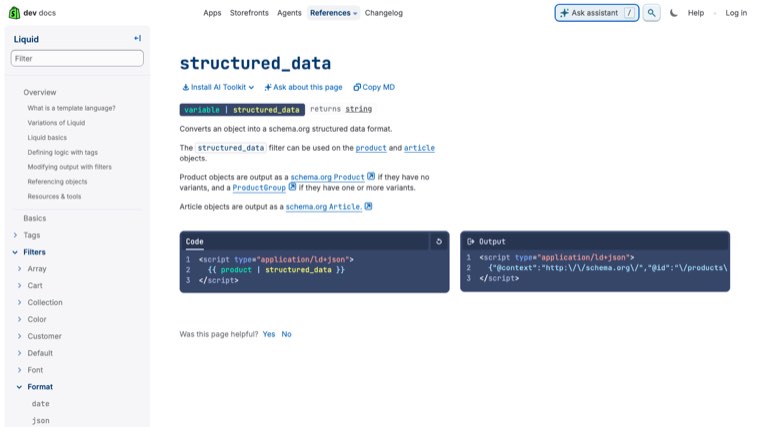
- Product structured data in themes that use Shopify's
structured_dataLiquid filter. Shopify's developer docs say the filter outputs a schema.orgProductfor products without variants and aProductGroupfor products with variants.
What Shopify leaves to you: the words on the page, the page title and meta description, image alt text, how variants are split, which apps load on the page, internal links, and what happens when a product goes out of stock or is removed. That's where product pages win or lose. For the alt text part, the free alt text generator describes a product photo in one line so you are not writing hundreds by hand.
Give every product page one job
Product page SEO starts with deciding what each page should rank for. A product page is the right page for specific searches that name a product type plus attributes: "linen duvet cover queen", "16 inch laptop backpack waterproof", a brand and model name. The broad search ("duvet covers") usually belongs to a collection page, because Google shows a choice of products for it.
Search the main phrase in Google before you optimize. If the results are mostly collection and category pages, point that phrase at your collection and give the product page a narrower term. If the results are single product pages, you're in the right place.
Assign one main phrase and a few close variants per product, and don't give the same phrase to two products. Near-identical products that target the same term split the ranking between them.
Page title and meta description
The product title shown on the page and the page title in Google don't have to be the same. In the Shopify admin, open a product and scroll to the search engine listing section to edit the page title, meta description and URL handle. Shopify's help center notes that page titles over 70 characters and meta descriptions over 320 characters might get cut off in search results. The free SEO title generator writes page titles that stay inside that limit.
Page title formula: product type in the buyer's words, then the key attribute, then the brand or store name if there's room. Here it is applied to two products from a made-up store called Northfold.
| Default page title | Rewritten page title |
|---|---|
| The Voyager | Voyager 20L Waterproof Laptop Backpack (16") | Northfold |
| Classic Tee - Heather | Organic Cotton Crew Neck T-Shirt, Heather Grey | Northfold |
Meta description: say what the product is, the one or two details that decide the purchase, and a reason to click, such as free returns or delivery times, if they're true for every visitor. The meta description doesn't set rankings, but a specific one gets more clicks than the first line of your description cut off mid-sentence.
URL handles and redirects
Shopify creates the handle automatically from the product title. A short, readable handle like /products/waterproof-laptop-backpack-20l is good, but don't spend much time on it. Shopify's own product page SEO guide lists obsessing over a product page URL as a mistake, and its help center warns against editing a handle too often.
If you do change a handle on a page that already gets traffic, make sure a redirect from the old URL is created. Shopify offers this as a checkbox when you edit the handle, and you can add or check redirects under URL redirects in the Online Store navigation settings. Without it, links and rankings pointing to the old URL hit a 404.
Products are also reachable through collection paths like /collections/bags/products/waterproof-laptop-backpack-20l. Shopify's canonical tag points those back to the /products/ URL. Keep your own internal links, menus and any hand-coded theme sections pointing at the /products/ version too. Google's ecommerce URL guidance is to use the same URL in internal links, sitemaps and canonical tags.
Product descriptions that rank
The description is usually the largest block of unique text on a product page, which makes it the biggest lever on what the page can rank for. The essentials:
- Say what the product is, who it's for and its main differentiator in the first two sentences.
- Answer the questions that decide the purchase: fit, materials, compatibility, dimensions, care.
- Replace manufacturer copy on your best sellers. Pages that share a description with dozens of other stores rarely win.
- Use H2 or H3 headings inside the description. Your theme already uses the product title as the H1.
We cover this in detail, including a before-and-after rewrite, AI-written descriptions and Google Merchant Center's rules, in our guide to product description SEO.
Product images and alt text
Images help product pages in Google Images, in Shopping results and in the main results, and they're the biggest file weight on most product pages, so they affect speed too.
- Size. Shopify accepts product images up to 5000 x 5000 px and under 20 MB, and says 2048 x 2048 px usually displays best for square images. Upload at that size rather than at camera resolution. Shopify's CDN resizes images for each screen.
- File names. Rename files before upload:
waterproof-laptop-backpack-navy-side.jpgtells Google more thanIMG_4471.jpg. - Alt text. In the product editor, click the image and choose Edit alt text. Describe the photo in plain words: "navy waterproof laptop backpack, side view showing the shoe pocket".
- Coverage. Show the product from several angles, in use, with scale, and a close-up of the material. Shopify also supports product videos (up to 10 minutes and 1 GB) and 3D models, which help shoppers more than they help rankings.
Variants: one page or several
Variants are where Shopify product page SEO gets less obvious. On Shopify, every variant of a product lives on the same page, and selecting one adds a ?variant= ID to the URL. The canonical tag stays on the main product URL.
That matches what Google recommends. Its ecommerce URL guidance says that if you use optional query parameters to identify variants, the canonical URL should be the one without the parameter. It also warns against using URL fragments (#black) for variants, because Google treats those as the same page.
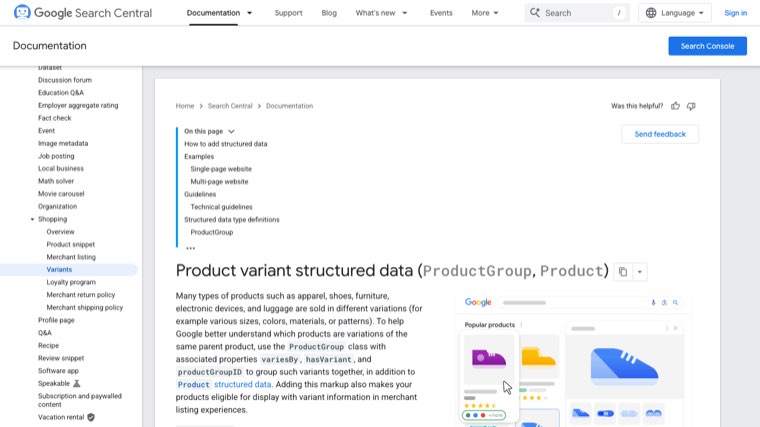
In February 2024 Google added structured data support for product variants. A ProductGroup with hasVariant, variesBy and productGroupID tells Google which products are sizes or colors of the same parent, and makes them eligible to show variant information in merchant listings.
When to keep variants on one page: when people search for the product and pick a size or color after landing, like a T-shirt in eight colors. One strong page beats eight weak ones.
When to split into separate products: when a variant has its own meaningful search demand and different content, like a sofa sold in a leather version and a fabric version, or a phone case for two different phone models. Separate products can each target their own term. Give each one its own description, not a copy with one word changed.
Product structured data on Shopify
Structured data is what makes a product eligible for rich results like price, stock status and review stars in Google. For merchant listings, Google requires name, image and an offers block with price and priceCurrency. It recommends properties like brand, description, aggregateRating and review, plus shipping and return policy details.
On Shopify, check three things:
- Does your theme output it? Run a product URL through Google's Rich Results Test. Dawn and other current Shopify themes output product markup. Some older or heavily customized themes don't.
- Is there more than one Product block? SEO apps and review apps often add their own product markup on top of the theme's. Two conflicting Product blocks with different prices or ratings is a common Shopify problem. Keep one source.
- Does it match the visible page? Only mark up ratings and reviews that shoppers can see on the page, and keep price and availability in sync with what's shown.
Search Console's Merchant listings and Product snippets reports will show errors and warnings across all your product pages once Google has crawled them.
Reviews, questions and trust signals
Reviews add fresh, unique text written in customers' own words, which often includes the exact phrases other buyers search. They also give Google the rating data for review stars.
- Show reviews in the page HTML. Review widgets that only load after the page renders, or inside an iframe, may not be read as part of the page. Check with Google's URL Inspection tool that the review text is in the rendered HTML.
- Add a short FAQ. Three to five real questions from your support inbox, answered on the page, catch long-tail searches and answer objections before the shopper leaves.
- Put trust details near the add to cart button. Delivery times, returns, warranty and payment options. They don't rank the page, but they decide whether the traffic you earn turns into orders.
Internal links to and from product pages
Product pages that nothing links to are hard for Google to find and hard to rank. A product usually picks up links from its collections, but there's more you can do.
- Keep products in the right collections, and keep collections linked from your main menu, so every product is a few clicks from the home page.
- Link related and complementary products. Shopify's Search & Discovery app lets you set up to 10 related products (alternatives) and up to 10 complementary products (often bought together) for each product, if your theme has those sections.
- Link from your blog. Buying guides and how-to posts that link to specific products with descriptive anchor text send both shoppers and ranking signals to those pages. Our guide to Shopify blog SEO covers how to set that up.
- Use breadcrumbs if your theme supports them, so each product links back up to its collection.
Page speed and app bloat
Product pages carry the most weight on a Shopify store: large images, variant pickers, review widgets, upsell apps, chat and tracking scripts. Google's Core Web Vitals measure how fast the main content loads (Largest Contentful Paint, good at 2.5 seconds or less), how quickly the page responds to taps and clicks (Interaction to Next Paint, good at 200 milliseconds or less) and how much the layout jumps (Cumulative Layout Shift, good at 0.1 or less).
- Audit your apps. Shopify lists adding too many apps as one of the main product page SEO mistakes. Each one can add scripts to every product page. Remove the ones you don't use, and check that uninstalled apps didn't leave code in your theme.
- Don't lazy-load the main product image. It's usually the Largest Contentful Paint element. Lazy-load images further down the page instead.
- Reserve space for widgets like reviews and upsells so the page doesn't shift as they load.
- Check real data. Search Console's Core Web Vitals report groups similar URLs, so all your product pages usually show up together.
Sold-out and discontinued products
Most guides skip this, and it's where stores throw away positions they spent months building.
| Situation | What to do |
|---|---|
| Temporarily sold out, coming back | Keep the page live and indexed. Show it as sold out, set availability to OutOfStock or BackOrder in the markup, and add a back-in-stock signup. |
| Permanently discontinued, with a close replacement | Redirect the old URL to the replacement product with a 301 in Shopify's URL redirects. |
| Permanently discontinued, no replacement, the page has links or traffic | Redirect to the most relevant collection. |
| Permanently discontinued, no traffic, no links | Delete it and let the URL return a 404. |
Google has said directly that you shouldn't use Search Console's removals tool for out-of-stock products. Leave the page up and mark it out of stock so people can see what's going on. If you also sync products to Google Merchant Center through Shopify's Google & YouTube app, keep feed availability in line with the page, because a mismatch can get products disapproved in Shopping results.
Product page SEO best practices checklist
| Area | Check |
|---|---|
| Targeting | One main phrase per product, not shared with another product or collection |
| Page title | Written by hand, product type plus key attribute, under 70 characters |
| Meta description | Specific, with the details that decide the purchase |
| URL handle | Short and readable, redirect created if it ever changes |
| Description | Unique, answers buying questions, H2 or H3 headings only |
| Images | Around 2048 x 2048 px, descriptive file names and alt text |
| Variants | One page unless a variant has its own search demand and content |
| Structured data | One Product or ProductGroup block, passes the Rich Results Test, matches the page |
| Reviews | In the page HTML, not only inside an iframe |
| Internal links | In a collection, linked from related products and blog posts |
| Speed | Unused apps removed, main image not lazy-loaded, Core Web Vitals in the good range |
| Stock | Sold-out pages stay live, discontinued pages redirect to the closest match |
Running Shopify SEO on autopilot
Product page fixes get a page ready to rank. What usually decides how much traffic a store earns over time is everything around those pages: the buying guides and comparisons that answer pre-purchase questions and link to products, and the backlinks that give the whole store authority.
Distribb runs that on autopilot. Connect your Shopify store and it does the keyword research for the searches your buyers make, writes articles around the products you sell with links to your product and collection pages, and publishes them straight to your Shopify blog on a schedule. It also builds backlinks from real businesses and tracks whether AI answers like ChatGPT and Perplexity mention your store. You can review drafts if you want, but it doesn't need you to.
Pro is $97 a month. Accelerator is $495 a month and adds a human editor who reviews every piece before it goes live. Agencies white-label Distribb for their Shopify clients, so a store can also go straight to the source. You can see what Distribb runs for ecommerce brands.
That leaves your time for the product pages themselves, starting with your best sellers.
FAQ
What is product page SEO?
Product page SEO is optimizing individual product pages so they rank for the specific searches buyers make before purchasing. It covers the page title, meta description, URL, description, images, variants, structured data, reviews, internal links, speed and how you handle stock changes.
How is ecommerce product page SEO different from collection page SEO?
Product pages target narrow searches that name a product type plus attributes or a model. Collection pages target broader searches where Google shows a choice of products. Mapping each keyword to the right page type stops product and collection pages from competing with each other.
Is Shopify good for product page SEO?
Yes. Shopify handles canonical tags, sitemaps, clean product URLs and, on current themes, product structured data. The work that's left is content and decisions: unique titles and descriptions, alt text, variant structure, app bloat and sold-out products.
How do I edit the SEO title of a Shopify product?
Open the product in the Shopify admin, scroll to the search engine listing section, click edit, and change the page title, meta description or URL handle. If you change the handle on a page that gets traffic, make sure a redirect from the old URL is created.
Should each product variant have its own page?
Usually not. Keep sizes and colors on one product page, which Shopify does by default with a canonical URL. Split a variant into its own product only when it has distinct search demand and you can give it genuinely different content.
Does Shopify add product schema automatically?
Most current themes, including Dawn, output product structured data using Shopify's structured_data filter, which produces a ProductGroup for products with variants. Check with Google's Rich Results Test, and watch for SEO or review apps adding a second, conflicting Product block.
What should I do with out-of-stock products for SEO?
If the product is coming back, keep the page live, mark it sold out and update the availability in the markup. If it's gone for good, redirect the URL to the closest replacement or its collection. Don't use Search Console's removals tool for stock changes.