

LSI keywords are the words and phrases that tend to appear alongside your main keyword on pages about the same topic: synonyms, subtopics, related products, the brands people compare and the questions they ask. You find them by reading what Google already shows for the term (autocomplete, People Also Ask, related searches), by counting which terms the top-ranking pages share, by running a free generator, and by reading the queries your own pages already get in Search Console.
One honest note before the methods. Google does not use latent semantic indexing. Its own search advocate, John Mueller, said in 2019 that there is no such thing as LSI keywords. What the SEO industry means by the term is real, though: a page that covers a topic uses the vocabulary of that topic, and a page that repeats one phrase forty times does not. So this guide treats "LSI keywords", "semantic keywords" and "related keywords" as the same job, and shows five ways to do it for free, using one keyword, standing desk, all the way through. Every screenshot and every number was collected on 6 October 2026.
We analyzed 5 ranking pages (WebFX, BeginnersBook, SEO Repair Kit, Search Logistics, SEO Buddy) about how to find LSI keywords and found that 0 of 5 describe counting the terms top-ranking pages share. Only 1 of 5 quotes Google's John Mueller saying LSI keywords do not exist.
What LSI keywords really are
Latent semantic indexing is an information retrieval technique from the late 1980s. It builds a matrix of which words appear in which documents and uses the patterns to guess that "car" and "automobile" belong together. It was designed for small, fixed document collections, not for a web index that changes every second, which is one reason Google never adopted it for ranking.
When a client or an editor asks you to "add LSI keywords", they mean one of four things, and it helps to know which:
| What people call an LSI keyword | What it really is | Standing desk examples |
|---|---|---|
| Synonyms and variants | Other ways to say the same thing | sit-stand desk, height adjustable desk, stand up desk |
| Subtopics and attributes | The parts, features and qualities of the thing | dual motor, memory presets, desk converter, anti-fatigue mat, cable management |
| Entities | Brands, products, people and places that belong to the topic | FlexiSpot, Uplift V3, IKEA, Vari, Jarvis |
| Questions | What searchers ask about it | is a standing desk worth it, what is the 20-8-2 rule, how long should you stand |
Google's ranking systems work with entities and meaning rather than with a word list, and the pages that rank for a topic tend to mention the same entities and answer the same questions. That is why the related terms still matter: not because a tool counts them, but because missing them usually means your page skipped something the reader expected. Our guide to semantic search SEO explains how Google reads entities, and the semantic SEO strategy guide covers how to structure a whole site around topics rather than keywords.
The five methods below are ordered from the quickest to the most thorough. Most writers only need the first two and a generator. If you are building a cornerstone page, do all five.
Method 1: Google autocomplete and related searches
Autocomplete is Google telling you what people type after your keyword, and it is the fastest source of related terms there is. Use a private window with personalisation off, or add &pws=0 to the search URL, so your own history does not shape the list.
- Type the seed keyword into Google and pause. Write down the ten suggestions.
- Add a space and each letter of the alphabet in turn: "standing desk a", "standing desk b", and so on. Each letter returns up to ten more.
- Put question words in front: "is standing desk", "why standing desk", "how to standing desk", "best standing desk", "what standing desk".
- Run the search, then scroll to the bottom for the "People also search for" block. Those eight terms are the ones Google thinks are closest to your query.
- Look at the result snippets on the way down. Terms Google bolds in a snippet are terms it treats as matching your query.
For "standing desk", the alphabet pass and the question prefixes gave us 309 unique suggestions. They sort themselves into groups you can see at a glance:
- Parts and accessories: standing desk converter, frame, legs, mat, keyboard tray, monitor stand, treadmill, walking pad, balance board, cable management.
- Where to buy: standing desk ikea, costco, amazon, walmart, wayfair, home depot, near me, under $200, under $500.
- Problems: standing desk not going up, keeps going down, error codes, e01 error, reset, locked how to unlock, asr error.
- Questions: is standing desk worth it, is standing desk healthy, is standing desk hsa eligible, is standing desk better than sitting, what standing desk height do i need.
- Brands: standing desk flexispot, uplift, vari, jarvis, vivo, fezibo.
The "People also search for" block for the plain query was: adjustable standing desk, standing desk converter, electric adjustable standing desk, standing desk amazon, standing desk ikea, standing desk with drawers, standing desk reddit, standing desk costco. For the informational variant "standing desk benefits" it was: standing desk benefits reddit, benefits debunked, benefits for students, benefits research, disadvantages of standing desk, pros and cons of standing desk, benefits of standing while working, benefits of standing 8 hours a day.
Two things to notice. The "problems" group is a whole article nobody writing a buying guide would think of, and "debunked" and "disadvantages" in the related searches tell you a benefits article has to address the counter-argument or it will feel one-sided to the reader and to Google.
Method 2: People Also Ask
The People Also Ask box is the list of questions Google has decided belong to your topic. Each one is a ready-made H3 or FAQ entry, and the questions inside it are also the terms Google expects a complete page to answer.
- Search the keyword and find the "People also ask" box, usually after the first or second result.
- Write down the four questions shown.
- Click each one. Google loads two or three more related questions every time a question is expanded, so four questions become twenty in a minute.
- Repeat for your two or three most important variants, because the box changes with intent.
For "standing desk" the box showed: Is a standing desk actually better for you? What is the 20-8-2 rule for standing desks? What is the best standing desk for the money? Are standing desks worth the hype? For "standing desk benefits" it showed: How long should you stand when using a standing desk? What are the downsides of using a standing desk? What is the 20/8-2 rule for standing desks? Is standing for 7 hours a day unhealthy?
The "20-8-2 rule" (twenty minutes sitting, eight standing, two moving) appears for both queries. When a term shows up in the questions for two different intents, it is not optional. A standing desk article that never mentions it is missing the one thing searchers in both groups asked about.
Google also showed a "Things to know" block for the plain query with five themes: cost, health benefits, types, choosing a desk, and ergonomics. Treat those as your H2s.
Method 3: Count the terms the top 10 pages share
This is the method the paid tools sell. KeySearch calls it "deep analysis" and keeps it in its paid plan, and most content optimisation tools are built on the same idea: open the pages that already rank, count the words and phrases, and keep the ones that appear on most of them. You can do it by hand in twenty minutes.
- Search the keyword and open the top ten results that are articles (skip store pages and forums).
- Copy the body text of each one into its own document.
- Count the words and two-word phrases in each document. The free keyword density checker lists the twenty most used words in any text you paste in, which is enough for this.
- Keep terms that appear on at least half of the pages. The number of pages a term appears on matters more than how many times one page repeats it.
- Strip the obvious: the keyword itself, stop words, and words that only describe the format ("article", "guide").
We did this for "standing desk benefits" on 6 October 2026 with the six articles in the top results: Harvard Health, Cleveland Clinic, Healthline, Hinge Health, the Orthopaedic Hospital of Wisconsin and Herman Miller's benefits page. The plain query "standing desk" returned store pages, a Reddit thread and Wirecutter, which is itself a finding: the SERP is commercial, so an informational article should target the "benefits" variant instead.
| Term | Pages it appears on (of 6) | Total mentions |
|---|---|---|
| back pain | 6 | 21 |
| sitting | 6 | 62 |
| research | 6 | 22 |
| blood (sugar, pressure) | 6 | 18 |
| energy | 6 | 18 |
| posture | 5 | 17 |
| mood | 5 | 14 |
| focus | 5 | 14 |
| productivity | 5 | 13 |
| weight | 5 | 11 |
| office workers | 4 | 13 |
| lower back | 4 | 7 |
| blood sugar | 4 | 6 |
| energy levels | 4 | 5 |
| ergonomics | 4 | 19 |
| musculoskeletal | 4 | 7 |
| calories / burns | 4 | 7 |
| sit-stand desks | 3 | 5 |
| heart disease | 3 | 5 |
| eye level | 3 | 5 |
| alternating between sitting and standing | 3 | 5 |
Read the table as a brief. A standing desk benefits article that does not mention back pain, posture, blood sugar, energy, mood, productivity and the sit-stand rhythm is thinner than every page it is competing with. It also shows the limits of the method: "research" appears on every page because the good pages cite studies, so the lesson is "cite a study", not "use the word research".
Two refinements. Count document frequency (how many pages use a term) and raw frequency separately, because a term one page repeats forty times is that page's obsession, not the topic's. And read the headings of those pages as well as the body, since a subtopic important enough to be an H2 on three competitors is one you need a section for.
Method 4: Free LSI keyword generators, tested on the same keyword
A generator does methods one to three for you in a few seconds, with varying honesty about where the terms come from. We ran "standing desk" through the free generators that rank for this query and recorded what each returned.
| Generator | What you get for free | Login | Search volume | Grouping | Export |
|---|---|---|---|---|---|
| Distribb | Up to 50 terms, 10 lookups an hour, 20 countries | None | Yes, with difficulty | Must include, related, questions | Copy or CSV |
| Answer Socrates | About 100 terms per search; 3 searches a day on a free account | Needed after the first look | No | Top queries plus A to Z | Copy or download |
| KeySearch | A basic list after a reCAPTCHA; the top-10 analysis is in the paid plan | None for the basic list | No | Flat list | No |
| LSIGraph | Nothing: the site now redirects to SurgeGraph, a paid AI writer | Paid | n/a | n/a | n/a |
Distribb free LSI keyword generator
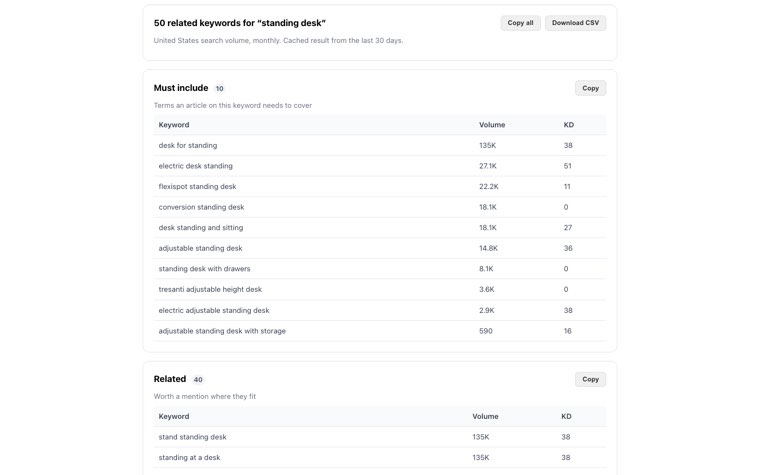
The Distribb LSI keyword generator returned 50 terms for "standing desk" in about ten seconds, each with US monthly search volume and a keyword difficulty score, sorted into three groups: ten terms an article must include (desk for standing, electric standing desk, flexispot standing desk, standing desk converter, sit-stand desk, adjustable standing desk, standing desk with drawers, tresanti adjustable height desk, electric adjustable standing desk, adjustable standing desk with storage), forty related terms worth a mention, and the questions people ask. You can switch between twenty countries, copy a group with one click or download the whole set as a CSV, and there is no login. It is free for ten lookups an hour.
Where it fell short on this keyword: the related group is padded with word-order variants ("standing at desk", "standing desk desk", "desk standing converter") that all carry the same volume because Google treats them as one query, and the questions group came back empty, so you still need method 2 for the questions. Treat the must-include group as the brief and read the related group with a filter on.
Answer Socrates LSI keyword generator
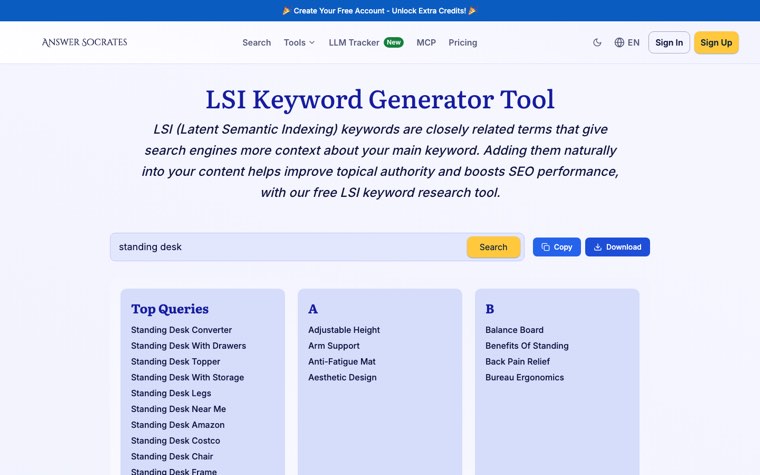
Answer Socrates returned the largest list: fifteen "top queries" (standing desk converter, with drawers, topper, with storage, legs, near me, amazon, costco, chair, frame, with wheels, ikea, treadmill, cable management, mat) followed by about a hundred two-word terms grouped alphabetically, from "adjustable height" to "typing posture". A sign-up box appears over the results, and a free account gives three searches a day. There are no search volumes, and some of the alphabetical entries ("bureau ergonomics", "hygiene considerations", "technology integration") read like a language model filling out a letter rather than anything people search, so check the ones you are not sure about in autocomplete before using them.
KeySearch free LSI keywords generator
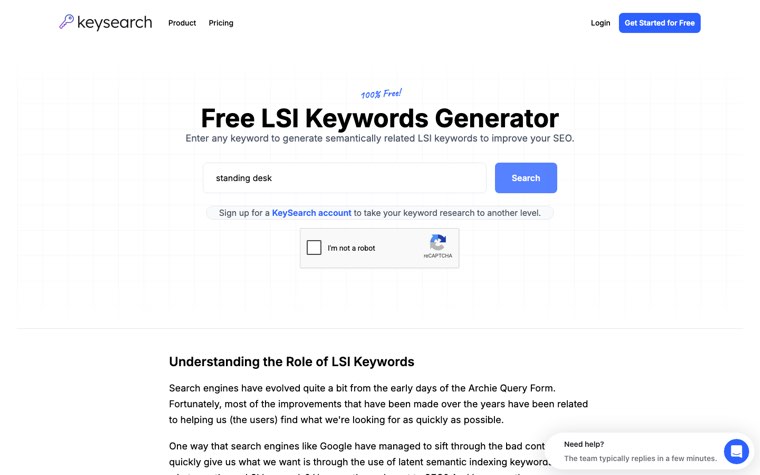
KeySearch ranks first for this query. Its free box asks you to pass a reCAPTCHA before it returns anything, so there is no screenshot of its output here. The page itself explains that the free tool uses the company's "basic" algorithm, and that the method worth having, which reads the first page of Google results and counts the terms they share, sits in the paid "deep analysis" feature. That is method 3 above, which you can do yourself.
LSIGraph
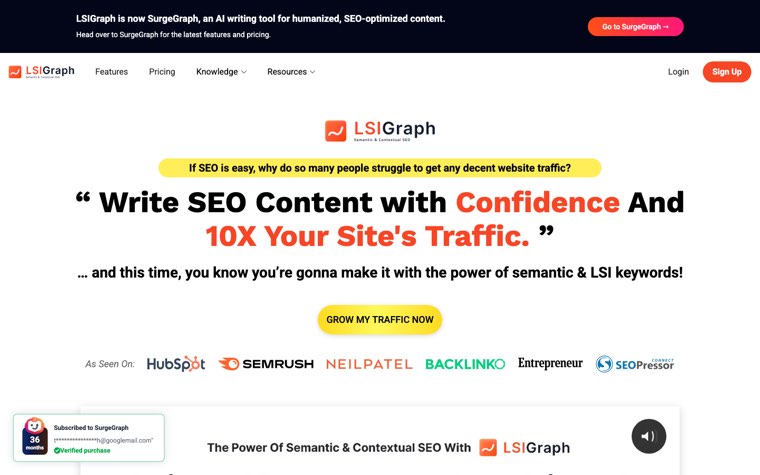
LSIGraph is the generator most older guides and videos recommend. On the day we checked, its homepage carried a banner reading "LSIGraph is now SurgeGraph, an AI writing tool", had no free input box, and pushed visitors to a paid plan. If a guide tells you to use LSIGraph for free, it is out of date.
Other places to look
Google Keyword Planner lists related keyword ideas with volume ranges if you have a Google Ads account, even with no spend. AnswerThePublic shows one free search without an account and three a day with one, and is strongest on questions and prepositions. Semrush's Keyword Magic Tool and Ahrefs' free keyword generator both do this well, but Semrush needs an account and Ahrefs' free tool sits behind a bot check. None of them is better than the Search Console method below once a page has been live for a few weeks.
Method 5: Search Console queries you already get
Every page that has been live for a few weeks has a list of related keywords nobody else can see: the queries Google already shows it for. Most of those queries are not in the text of the page. They are the terms Google decided the page is about anyway, which makes them the most trustworthy related keywords you will find.
- Open Google Search Console, go to Performance, and set the date range to 16 months.
- Add a page filter for the URL you are improving, then switch to the Queries tab.
- Sort by impressions. The queries with many impressions and few clicks are the terms Google tests the page for and finds it weak on.
- Paste the page text into the keyword density checker and compare. Any query with real impressions that does not appear in the text is a related keyword to add, usually as a heading or an FAQ entry.
- Filter the queries with a regular expression such as
^(how|what|why|is|can|does)to pull out the questions, and answer the ones you do not already answer.
For a new page with no data yet, run this on the closest existing page on your site. If you have written about office ergonomics, its query list will contain standing desk terms you can use now. Our guide to finding low-hanging fruit keywords covers the same report from the ranking side, and the low-competition keywords guide shows how to decide which of those terms deserve a page of their own rather than a paragraph.
How many LSI keywords to use, and where
There is no ratio. A 1,500-word article usually works in eight to fifteen related terms without forcing anything, plus two or three of the questions as headings. The list you built from the methods above is a checklist of what to cover, not a quota of words to insert.
| Placement | What goes there | Standing desk example |
|---|---|---|
| Title and H1 | The main keyword and at most one variant | Standing desk benefits: what the research says (and the 20-8-2 rule) |
| H2 headings | The subtopics from methods 2 and 3 | Back pain and posture; Blood sugar and energy; How long to stand |
| H3 and FAQ | The questions from People Also Ask and Search Console | What is the 20-8-2 rule? Is standing 7 hours a day unhealthy? |
| First 100 words | The definition, using two or three of the must-include terms | sit-stand desk, electric standing desk, alternating sitting and standing |
| Body | Entities and attributes where they belong | FlexiSpot, Uplift V3, dual motor, memory presets, anti-fatigue mat |
| Image alt text and internal anchors | Variants you did not use in headings | height adjustable desk, standing desk converter |
What not to do: paste the list into a paragraph at the bottom, write a sentence for every word-order variant (Google already treats "standing desk converter" and "converter standing desk" as one query), or hide terms in white text. Google's spam policies name keyword stuffing explicitly, and a page that reads like a word list loses the reader before it loses rankings.
A good test: read the finished page and ask whether a person who knows the topic would notice anything missing. If the answer is no, the semantic coverage is done regardless of what any tool's score says.
Worked example: 30 related terms for "standing desk"
Here is the output of the five methods combined into one brief for a standing desk guide, with the source of each term and where it would go. Everything in the table came from the sessions described above, on 6 October 2026, US results.
| # | Related term | Source | Where to use it |
|---|---|---|---|
| 1 | sit-stand desk | Generator (must include) | First paragraph |
| 2 | electric standing desk | Generator (27,100 searches a month) | H2: types of standing desk |
| 3 | adjustable standing desk | Generator (14,800) | First paragraph |
| 4 | standing desk converter | Autocomplete, related searches, generator (18,100) | H2: converters vs full desks |
| 5 | standing desk with drawers | Related searches, generator (8,100) | Body, under storage |
| 6 | standing desk frame / legs only | Autocomplete, Answer Socrates | Body, under types |
| 7 | dual motor | Autocomplete, Google AI Overview | Body, under what to look for |
| 8 | memory presets | Autocomplete ('how to set standing desk presets') | Body, under what to look for |
| 9 | standing desk height | Autocomplete ('what standing desk height do i need') | H3: how high should it be |
| 10 | anti-fatigue mat | Autocomplete, Answer Socrates | Body, under accessories |
| 11 | walking pad / treadmill | Autocomplete, Answer Socrates | Body, under accessories |
| 12 | cable management | Autocomplete, Answer Socrates | Body, under accessories |
| 13 | monitor arm / eye level | Autocomplete, co-occurrence (3 of 6 pages) | Body, under ergonomics |
| 14 | FlexiSpot, Uplift V3, IKEA, Vari, Jarvis | Autocomplete, generator, SERP | Body, under brands |
| 15 | standing desk under $200 / under $500 | Autocomplete | H2: how much to spend |
| 16 | standing desk costco / ikea / amazon | Related searches, generator | Body, under where to buy |
| 17 | 20-8-2 rule | People Also Ask (both queries) | H3 and FAQ |
| 18 | how long should you stand | People Also Ask | FAQ |
| 19 | is a standing desk worth it | Autocomplete, People Also Ask | FAQ |
| 20 | standing desk benefits debunked / disadvantages | Related searches | H2: the downsides |
| 21 | back pain / lower back pain | Co-occurrence (6 of 6 pages) | H2: health effects |
| 22 | posture | Co-occurrence (5 of 6) | H2: health effects |
| 23 | blood sugar | Co-occurrence (4 of 6) | Body, under health effects |
| 24 | energy levels and mood | Co-occurrence (5 of 6) | Body, under health effects |
| 25 | productivity and focus | Co-occurrence (5 of 6) | Body, under health effects |
| 26 | calories burned standing vs sitting | Co-occurrence, autocomplete | FAQ |
| 27 | alternating between sitting and standing | Co-occurrence (3 of 6) | Body, under how to use one |
| 28 | standing desk not going up / error codes / reset | Autocomplete | H2: troubleshooting (or a separate page) |
| 29 | HSA / FSA eligible | Autocomplete | FAQ |
| 30 | standing desk ergonomics | Co-occurrence (4 of 6), Things to know | H2: setting it up |
The resulting outline writes itself: what a standing desk is and the main types; what to look for (motors, presets, height range, stability); converters vs full desks; how to set one up (height, monitor at eye level, mat); the health evidence, including the downsides and the 20-8-2 rule; brands and what to spend; troubleshooting; and an FAQ built from the questions. That is a page that covers the topic the way the top results do and adds the parts (troubleshooting, cost tiers, the counter-argument) that most of them skip.
Notice how few of the thirty came from a generator alone. Generators are fastest for the volume data, but the questions came from People Also Ask, the health vocabulary came from the competitor pages and the troubleshooting cluster came from autocomplete. Use all of them, and spend the time you save on the writing.
How Distribb builds semantic coverage into every article
Everything above is what a writer does by hand before drafting. Distribb does it as part of writing. Connect your site and the platform runs the whole SEO loop on its own: it finds the keywords worth a page, builds a brief for each one from the related terms, entities and questions the top results share, writes the article, publishes it to WordPress, Webflow, Shopify or your CMS of choice, earns backlinks through its exchange network, and tracks whether ChatGPT, Perplexity and Google's AI Overviews cite your pages. Nothing in that loop waits on your calendar.
The free LSI keyword generator on this site is a small piece of that brief step, published as a standalone tool so you can see how the grouping works. Inside the platform, the same data feeds every article automatically, and the writer is held to the coverage, not just the keyword.
Pricing is $97 a month for Pro and $495 a month for Accelerator, which adds a human reviewing every piece before it goes live. The honest limitation is that Distribb is a platform, not a bespoke creative agency: it will cover your topics completely and keep publishing every week, but it will not design a brand campaign. If that trade is right for you, see how Distribb builds semantically complete articles for you.
LSI keywords FAQ
What are LSI keywords in SEO?
In SEO usage, LSI keywords are the terms that appear alongside a main keyword on pages about the same topic: synonyms, subtopics, related products and brands, and the questions people ask. The name comes from latent semantic indexing, a 1980s indexing technique that Google does not use. The idea that a page should use the vocabulary of its topic still holds.
Are LSI keywords a Google ranking factor?
No. Google's John Mueller said in 2019 that there is no such thing as LSI keywords. Google does judge whether a page covers a topic, and pages that naturally use the related terms, entities and questions of a topic tend to rank better than pages that repeat one phrase, so the work behind the term still pays.
How do I find LSI keywords for free?
Type the keyword into Google and record autocomplete, the People Also Ask questions and the related searches at the bottom of the page. Open the top-ranking articles and note the terms they share. Run the keyword through a free generator such as the Distribb LSI keyword generator for search volumes. For pages already live, read the Queries report in Search Console.
What is the best free LSI keyword generator?
On our test with "standing desk" on 6 October 2026, Distribb's generator was the only free one that returned search volume and sorted the terms into must-include, related and questions with no login. Answer Socrates returned the longest list but no volumes and needs an account after the first look. KeySearch's free list sits behind a reCAPTCHA, and LSIGraph no longer offers a free tool.
What is the difference between LSI keywords, semantic keywords and related keywords?
In practice they are the same list. "Semantic keywords" and "related keywords" are the more accurate names, because they describe what the terms are (words related to the topic) rather than a technique Google does not use. Long-tail keywords are different: those are longer, more specific queries that can deserve their own page. Our long-tail keyword research guide covers when a related term should become a separate article instead.
How many LSI keywords should I use in an article?
Use the ones that belong. A 1,500-word article usually carries eight to fifteen related terms naturally, plus two or three of the questions as headings. Treat the list as a coverage checklist, not a word count, and never add a paragraph just to hold the leftovers.
Are LSI keywords the same as synonyms?
Synonyms are one kind of related term, but the useful list is wider: subtopics, attributes, brands, and questions. For "standing desk", a synonym is "sit-stand desk"; the related terms that make the page complete are things like dual motor, anti-fatigue mat, the 20-8-2 rule and FlexiSpot.
How do I find long-tail keywords for free?
Use the same sources. Autocomplete with the alphabet pass and question prefixes produces hundreds of long-tail variants ("standing desk under $200", "standing desk not going up"), and Search Console shows the long-tail queries your pages already appear for. Our guide to long-tail keyword research walks through choosing which ones deserve their own page.
Can I use LSI keywords for YouTube videos and product pages?
Yes. Related terms belong in a video's title, description and chapter names, and on a product page they belong in the specification list, the FAQ and the alt text. The sources are the same; only the placement changes.
Related reading: long-tail keyword research for deciding which related terms deserve their own page, and the semantic SEO strategy guide for organising a whole site by topic.