
No software generates backlinks. A backlink requires a second website to publish a link to yours, which requires a person or a system on that side to agree. Anything claiming to generate links either submits you to directories, posts to sites that accept anything automatically, or is describing outreach software in more exciting language.
That said, AI does real work in link building, just not the work the category name implies. This covers the 10 tools that exist and do something useful, and what each one is actually doing underneath. Readers on a tight budget should also see our roundup of affordable SEO tools, which covers the free and under-$50 end of the same market.
An important correction to this page
An earlier version of this article recommended five products that do not exist: LinkPulse AI, BacklinkBot Pro, RankForge AI, SEOBoost AI and LinkCraft AI. None of them is a real company. "BacklinkBot Pro" has since been quoted elsewhere as though it were a Distribb product, which it never was.
We are correcting this in public rather than replacing the list quietly, because that name has propagated and anyone who went looking for it deserves an explanation. Every tool on the current list was loaded in a browser in August 2026 before publication, and one product that appears on competing lists for this query was dropped because its own homepage shows it is an advertising tool, not a link building one.
What AI genuinely does in link building
| Job | Does AI help? | What it looks like in practice |
|---|---|---|
| Finding prospect sites | Yes, substantially | Semantic matching on topic rather than keyword, at scale |
| Qualifying prospects | Yes | Reading a site and judging relevance, not just its metrics |
| Finding the right contact | Partly | Pattern matching and verification, still misses on large sites |
| Writing the pitch | Barely | Drafts read like drafts. Reply rates fall when sent as generated |
| Sending and following up | Yes, fully | Ordinary sequencing, and it works |
| Getting the yes | No | This is a person deciding. No model changes that |
| Placing the link | Only where nobody is asked | Directories and auto-approve sites, which is the low-value end |
The pattern: AI compresses the research and admin, which used to be most of the hours. It does not touch the part that determines whether you get a link.
1. Distribb

We are first here because we solve the last row of that table rather than the first. Distribb runs a backlink exchange: businesses in the network agree in advance to link to each other's content, and matching is automated on relevance and quality. Nobody has to say yes to a cold email, because consent is part of joining.
That is the only structure we know of where the whole path from "I want a link" to "there is a link" runs without a reply rate in the middle. It is also, unlike a directory blaster, a link from a site that publishes real content to real readers. Nothing here is generated, which is the point of putting an exchange at the top of a list about generators.
See the backlink exchange, or the comparison of the best backlink exchange platforms if you want to see the alternatives first.
Pros:
- Consent built in: the network members have already agreed to link, so no reply rate stands between you and the placement.
- Niche matching: pairs run on industry and quality rather than on whatever inventory happens to be free.
- Real editorial pages: links land inside articles on sites that publish for readers.
- No per link invoice: one subscription covers the placements instead of a price per link.
Cons: you do not choose the specific sites. If your campaign needs a link from three named publications, you need outreach software from further down this list and a person to write the pitches.
For who: businesses that publish regularly and want links without running an outreach desk.
Pricing: $97 a month with a 7-day free trial. Accelerator, which adds managed outreach on top, is $495 a month.
2. Linkee.ai
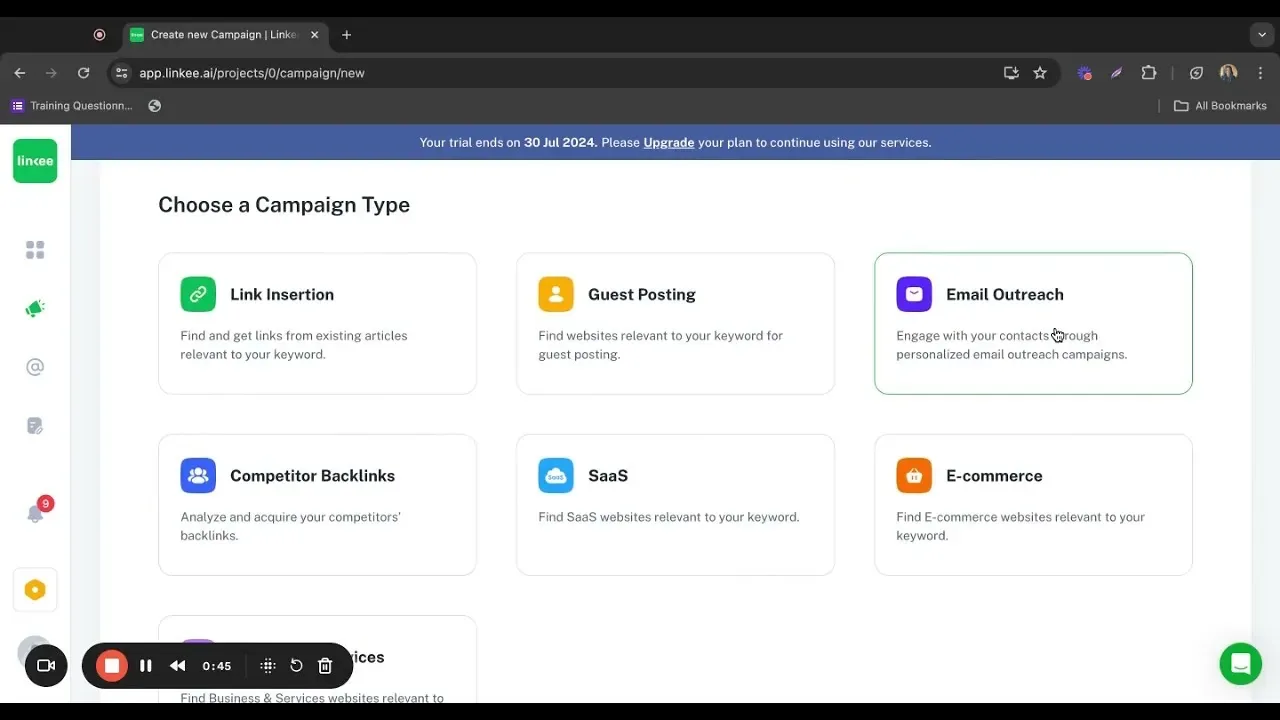
Linkee.ai is the closest thing to an AI link building system that exists. It takes a keyword, finds prospects, qualifies them, finds contacts and runs the outreach, in one product rather than four.
The qualification step is where the AI earns its place. Instead of filtering a list by domain rating, it reads the site and judges topical fit, which removes a large amount of manual review from the top of the funnel. It still sends emails to people who did not ask for them, so the ceiling on results is the same as any outreach programme.
Pros:
- Whole chain in one tool: keyword in, prospects, contacts and sequences out.
- Qualification reads the page: topical fit is judged from the site itself, not from domain rating.
- Credit based: cost tracks how much you actually run rather than how many seats you hold.
- AI native: the research layer was built around the model rather than bolted on afterwards.
Cons: it is still cold outreach, so the reply rate ceiling is unchanged, and the AI pitches read like AI pitches until you edit them.
For who: solo SEOs and small teams who would rather buy one product than stitch four together.
Pricing: $300 a month on the Business plan billed monthly. Billed yearly it is $80.83, $164.17 and $298.33 a month across Essential, Pro and Agency. There is a free trial and no permanent free plan.
3. Respona
Respona changed shape in 2026 and the old description of it as outreach software no longer holds. Its pricing page now sells guaranteed placements per result rather than a seat in a tool, with publisher DR bands attached to each price.
You still get control over where you appear: domains can be pre-approved, turnaround is either 28 or 14 days, and you can request a format such as a listicle, a comparison guide or a contextual mention. What you no longer get is a piece of software you operate yourself. If you came here for the outreach app, that is the change to know about before you sign up.
Pros:
- Pay per result: you buy placements that publish, not a seat in an app.
- DR floor stated up front: every price band names the publisher authority it covers.
- Domain approval: pre-approve every site or stay hands off, your choice.
- Format control: listicles, comparison guides and contextual mentions can be requested by name.
Cons: this is now a placement service, so cost scales linearly with links and there is no tier for a team that wants to run its own campaigns.
For who: brands that would rather buy managed placements than operate an outreach programme.
Pricing: $100 per placement at DR 20 and up, rising through $160, $240 and $400 to $500 at DR 60 and up. Volume discounts start at $3,000 a month.
4. Semrush Link Building Tool
If you already pay for Semrush, this is capability you probably are not using. It generates prospects from your target keywords and your competitors' backlinks, then lets you run the outreach from inside the platform.
It is not as capable as a dedicated outreach tool, and it is more than enough for a team running campaigns occasionally rather than continuously. Prospect quality depends heavily on the keywords you feed it, and the email sending is basic.
Pros:
- Already in the subscription: nothing new to buy if you pay for Semrush.
- Competitor backlink prospects: the list comes from real link data rather than a scrape.
- Outreach in platform: templates, follow ups and reply tracking without leaving.
- One login: research, site audit and outreach share the same account.
Cons: the sending side is thin, so anyone running continuous campaigns will outgrow it and end up paying for a second tool anyway.
For who: existing Semrush subscribers who run link campaigns in bursts.
Pricing: Semrush plans are $139, $199, $299 and $549 a month, dropping to $117.33 for the entry plan on annual billing. The link building tool is included rather than sold separately.
5. Pitchbox

The agency standard. Personalisation at scale, multi-step sequences, team assignment, and integrations that pull metrics onto every prospect before you write anything.
Its AI features are practical rather than flashy: summarising a prospect's site, suggesting personalisation angles, prioritising a list. All of it saves time without pretending to replace judgement. The pricing tells you who it is for.
Pros:
- Deep sequencing: multi-step campaigns with conditional steps.
- Team workflow: assignment, approvals and shared prospect lists.
- Metrics on arrival: SEO data attached to every prospect before you write a word.
- Practical AI: summarising and prioritising rather than pretending to write the pitch.
Cons: there is no meaningful entry tier, so an in-house team running two campaigns a quarter pays agency rates for capacity it will never touch.
For who: agencies and in-house teams with outreach running continuously.
Pricing: Pro $300 a month, Advanced $600, Scale $1,200. Annual billing brings those to $210, $420 and $825.
6. BuzzStream
The relationship layer. Where everything else optimises for sending, BuzzStream optimises for remembering who you spoke to, what they said and what happened next.
For link building that compounds over years with the same publications, that history is the asset, and nobody else in this category treats it as the product. The trade is that its prospecting is weaker than the alternatives and the interface shows its age.
Pros:
- History is the product: contacts, threads and outcomes stay together for years.
- Browser capture: add a prospect with its details while you are on the page.
- Team sharing: middle tiers keep everyone on the same relationship record.
- Cheap solo tier: a single user plan aimed at consultants.
Cons: prospecting is the weak half, so most teams end up pairing it with Ahrefs or Semrush for the list itself.
For who: teams that work the same publications year after year.
Pricing: Starter $49 a month, Growth $174, Professional $424, and custom plans from $999. A single user plan is also listed at $19 a month.
7. Ahrefs
Not a generator, and the foundation under most of the tools above. Link Intersect finds sites linking to several competitors but not to you, which is the highest quality prospect list available anywhere.
Its AI features are modest and its data is the point. If you are only buying one thing in link building, buy research.
Pros:
- Best prospect data: Link Intersect produces the warmest list available anywhere.
- Research depth: the index other tools quote is this one.
- Free Webmaster Tools: full data on a site you verify, at no cost.
- Credit scaling: heavy workflows are metered rather than priced per seat.
Cons: it contacts nobody and places nothing, so it is half a workflow and you still have to supply the other half.
For who: anyone who wants the list to be right before spending a single email on it.
Pricing: Starter $29 a month, Lite $129, Standard $249, Advanced $449, Enterprise $1,499. Webmaster Tools is free for a site you own.
8. Hunter
Finds and verifies the email address behind a domain, which is where most campaigns quietly fail. A great prospect list with a 40 percent bounce rate is not a great prospect list.
Verification matters more than discovery here. Sending to unverified addresses damages your sending reputation, and that damage carries into every future campaign you run from the same domain.
Pros:
- Verification before sending: deliverability checked while the list is still being built.
- Bulk lookup: CSV in, verified addresses out.
- Works with your sender: pushes into Pitchbox, BuzzStream or your own client.
- Usable free tier: 50 credits a month covers a small campaign.
Cons: it gets you to a role or a name, not reliably to the right editor at a large publication, so the biggest targets still need manual research.
For who: anyone sending outreach at any volume, as a layer under the outreach tool.
Pricing: a free plan with 50 credits a month, then Starter $49, Growth $149 and Scale $299 a month. Yearly billing brings those to $34, $104 and $209.
9. ListingBott

The honest version of what most backlink generator tools actually are: automated submission to directories and listing sites. It fills in the forms so you do not have to.
For a brand new site this has a narrow, real use. Directory listings help with indexing and give a new domain a baseline presence, and doing a hundred submissions by hand is a miserable weekend. What it will not do is move competitive rankings, because links anyone can get are worth what anyone pays for them.
Pros:
- Removes a tedious job: a hundred directory submissions without losing a weekend.
- Sensible at launch: helps a new domain get indexed and visible.
- One-off cost: nothing to cancel later.
- Placement report: you get the list of where you were actually submitted.
Cons: directory links do not shift competitive rankings, so this is a launch task and not a link building programme.
For who: new sites doing their initial listings once, then moving on.
Pricing: $499 as a one-off on the tier its site currently shows, or $999 for the package that adds links from its own blogs. Priced per package, not per month.
10. Linkody
Monitoring rather than building. It watches the links you have and tells you when one disappears, goes nofollow or the page starts returning a 404.
Recovering a link you already earned is the cheapest link acquisition there is, and nobody notices these without monitoring. Sites get redesigned, and paid links get stripped when a new SEO arrives.
Pros:
- Loss alerts: tells you when a link is removed, goes nofollow or starts 404ing.
- Cheapest useful tier: monitoring from under $15 a month.
- Scales sensibly: limits track domains and links rather than users.
- 30 day trial: no card required to test it.
Cons: it finds nothing new, so it is a maintenance tool sitting beside your actual acquisition work, never instead of it.
For who: sites with a link profile already worth protecting.
Pricing: $14.90 a month for Webmaster, through $24.90, $49.90 and $99.90, up to $153.90 for Agency XL. Yearly billing is cheaper, and the trial runs 30 days.
Also worth knowing
SEObot markets on this query and is a real product. It also competes directly with us, so evaluate it yourself rather than taking our assessment either way.
Ryze AI appears on other lists for this query as an AI backlink tool. Its own homepage describes it as advertising management across Google, Meta, ChatGPT and Perplexity, so we left it out. This is the kind of thing worth checking yourself before you buy from any list, including this one.
What to avoid in this category
Anything promising a number of links for a price with no site names. You are buying inventory from a list the vendor knows you would reject.
Auto-posting to comments, forums and profiles. This is the category Google's link spam policy names directly, and it is what "generator" usually means when it means anything.
Private blog networks sold as AI-powered. The AI part is irrelevant. The network part is the risk.
Volume framing. "10,000 backlinks" is a warning, not an offer. Ten relevant links from real sites will outperform ten thousand from a network, and the second option can cost you the site.
What to do instead
Start with research. Find the sites already linking to your competitors, because they have demonstrated they link to businesses like yours. Our guide to automating backlink building covers the tooling for that, and the wider category view is in automated SEO software.
Then pick one route: outreach with a real pitch, an exchange where both sides consent, or paid placements you understand are paid. All three work. What does not work is hoping software will produce the links without one of those three things happening.
Then publish something worth linking to, because every route above converts better when the thing you are pointing at is good. Our AI SEO content generator and best SEO tools for content creation lists cover that half.
But there’s a missing puzzle piece: measuring what happens after the click. It’s one thing to earn a link; it’s another to know if the visitor sticks around, browses products, or bounces. That’s where a session‑analytics tool comes in. By pairing your backlink engine with a platform that tracks on‑site behavior, you close the loop and can fine‑tune your content topics based on actual engagement. Learn more about how to choose and use a session analytics tool for better user insights to get the most out of every backlink you earn.
Frequently asked questions
Do AI backlink generators actually work? The ones that automate research, contact finding and outreach admin work well and save real hours. The ones that claim to generate the links themselves are either directory submitters or link schemes. The name of the category describes the second kind.
Are automatically generated backlinks safe? Directory submissions are low value but generally harmless. Automated posting to comments, forums and profiles, and links from private blog networks, are what Google's link spam policy targets. The line is whether a human on the other side agreed to the link.
What is the best AI backlink tool? Linkee.ai if you want the whole outreach chain in one product, Ahrefs if you want the best prospect data, an exchange if outreach reply rates are your constraint. There is no single answer because these are different jobs.
What about building my own generator? Some teams do, wiring a research API to an outreach sequencer. It is a reasonable project if you have the engineering time and a specific workflow the off-the-shelf tools do not fit. We cover the practical side in how to build an automated backlink generator, and the operating side in using an automatic backlink generator.
How many backlinks do I need? The wrong question. A page within striking distance may move on three relevant links. A page ranked 60th will not move on three hundred. Relevance and the quality of the page receiving the link decide it, not volume.
Can I get backlinks for free? Yes, and it is the version that works best. Brand mention reclamation, fixing broken links that pointed at competitors, and publishing something genuinely worth citing all cost time rather than money and produce better links than anything you can buy.
Why did this page recommend products that do not exist? An earlier version was generated without every product being verified. That check now happens for every article we publish: each product's homepage is loaded in a browser before its name goes on the page. We would rather say that plainly than have you find out on your own.