

An ecommerce SEO strategy is the plan that decides which searches your store should win, which page type should win each one, what order you build them in and how you will know it worked. A list of SEO tasks tells you what to fix. A strategy tells you what to leave alone, where the revenue is, and what the store looks like in search twelve months from now.
Most ecommerce SEO advice explains the tactics well: keyword research, category and product pages, technical SEO, content, links. What it usually skips is the planning layer: a way to prioritize, a keyword-to-page map you can fill in, a rule for which filter pages deserve to be indexed, and a template for the strategy document itself. Those are the core of this guide, and the template is near the end.
What an ecommerce SEO strategy is
Most stores already know the tactics. The trouble is that a store with 400 products, 30 collections and a blog can generate hundreds of reasonable SEO tasks, and doing them in the order they were discovered wastes most of the effort. A strategy turns that pile into a small number of decisions:
- Which searches matter. The ones that lead to revenue for products you have margin on and can keep in stock.
- Which page should rank for each. A collection, a product, a buying guide or a comparison, and never two of them for the same search.
- Where you want to appear. Classic search results, the Shopping tab, Images, Lens, Maps and AI answers all take slightly different inputs.
- What order you build in. Usually the pages closest to revenue first.
- What you will not do. Filter pages you won't index, blog topics that won't sell anything, link tactics you won't use.
- How you measure and when you review. Otherwise the strategy is written once and never looked at again.
If you want the execution side, the step-by-step fix order for a store, our guide to SEO for an online store in the order that works covers it. This page is about the plan that sits above that work.
Set goals from revenue, then take a baseline
Rankings are an input. The goals in an ecommerce SEO strategy should be the things the business already cares about, measured for organic traffic only:
- Organic revenue and its share of total revenue.
- Non-brand organic clicks to collection and product pages. Brand searches will grow when the business grows, so they hide whether SEO itself is working.
- Organic conversion rate, so you notice when traffic grows but buyers don't.
- Indexed pages versus pages you want indexed, from the Pages report in Search Console.
Then write the baseline down before you change anything. In Search Console, filter the Performance report by page with a URL containing /collections/, then /products/, then your blog path, and record clicks and impressions for the last three months for each. Add a query filter that excludes your brand name. In your analytics tool, record organic revenue and conversion rate for the same period. Those numbers, split by page type, are what every later review compares against.
A useful goal reads like this: "Grow non-brand organic clicks to collection pages from 3,000 to 7,500 a month within 12 months, while holding organic conversion rate above 1.8%." The numbers are an example, but the shape matters: one metric, one page type, a date and a guardrail.
Decide where on Google you want to show up
An ecommerce SEO strategy written a few years ago could assume one surface, the ten blue links. Google's own ecommerce documentation now lists six places store content can appear: Google Search, Google Images, Google Lens, the Shopping tab, Business Profile and Google Maps. Each one takes a slightly different input.
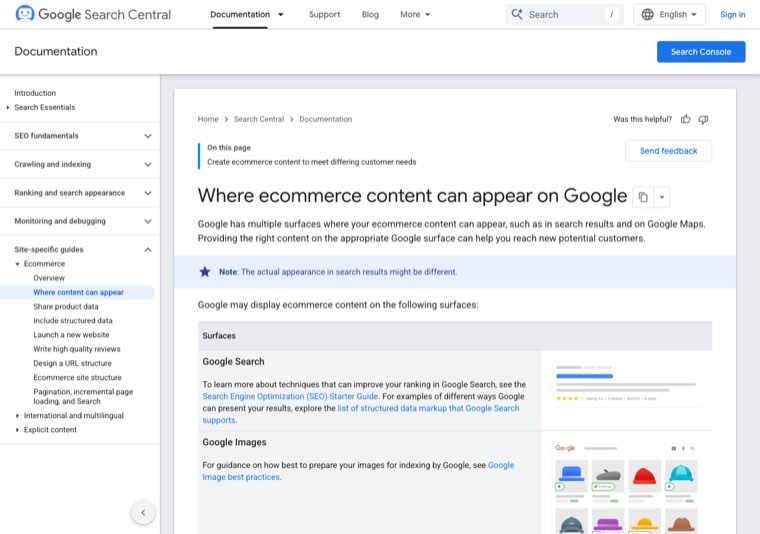
Three decisions come out of that list:
- Do you share a product feed with Google Merchant Center? According to Google, the Shopping tab, Lens and Maps visibility depend on your products being in Merchant Center. Free listings cost nothing, so for most stores the answer is yes, and keeping the feed accurate becomes part of SEO work rather than an ads task.
- Does the store have a physical location? If it does, Business Profile and local inventory belong in the strategy. If it doesn't, skip them and don't spend time there.
- How much does visual search matter? For fashion, furniture and home goods, image quality and image SEO carry more weight than they do for replacement parts.
AI answers add a seventh surface that sits on top of the others. In May 2025 Google said its Shopping Graph holds more than 50 billion product listings and refreshes over 2 billion of them every hour, and its AI Mode shopping experience draws on that data. What that means for a strategy is that clean product data and structured data now feed both classic search and AI shopping answers, so they belong in the plan from the start rather than as a technical clean-up later.
Map search demand to page types
The keyword-to-page map is the most useful single document in an ecommerce SEO strategy. Every keyword you plan to target gets exactly one page, and the page type follows from what Google already shows for that search. If the results are grids of products, it's a collection search. If they are single products, it's a product search. If they are articles, it's a content search, and a collection page won't rank there however well you optimize it.
| Search pattern | Example | Page type that should rank |
|---|---|---|
| Category plus modifier | women's waterproof hiking boots | Collection page |
| Brand plus model or exact attributes | trail runner 4 gore-tex size 9 | Product page |
| Best or top plus category | best hiking boots for wide feet | Buying guide or comparison article |
| How to choose, how to use, sizing | how should hiking boots fit | Guide, linked to the matching collection |
| X vs Y | leather vs synthetic hiking boots | Comparison article |
| Brand or shop name | your store name plus returns | Home page or policy page |
Build it as a spreadsheet with one row per keyword: keyword, monthly volume, what Google shows today, target URL, page status (exists, needs work, needs creating) and priority. Two rules keep it clean. First, if two keywords return the same results, they belong to the same page. Second, if a keyword already has a page on your store, you improve that page instead of creating a new one. For the research that fills the map, our guide to ecommerce keyword research walks through finding category and modifier terms.
Set the site structure rules before you fill it
Structure decisions are cheap to make on paper and expensive to change once URLs have rankings. Google's guidance for ecommerce sites is to link from menus to category pages, from category pages to sub-category pages and from sub-category pages to all product pages, to use normal <a href> links rather than JavaScript events, and to link important products from the home page or from content. Your strategy should turn that into three written rules.
Rule 1: how deep a product can sit
Decide the maximum number of clicks from the home page to any product you care about. Three is a common target. Products that sit deeper usually need a collection in between, or links from buying guides.
Rule 2: which filter combinations get their own indexable page
Filters and facets are where large stores lose control. Every combination of color, size, price and brand can create a new URL. Google's crawling documentation on faceted navigation says these URLs cause overcrawling and slower discovery of the pages you actually want found.
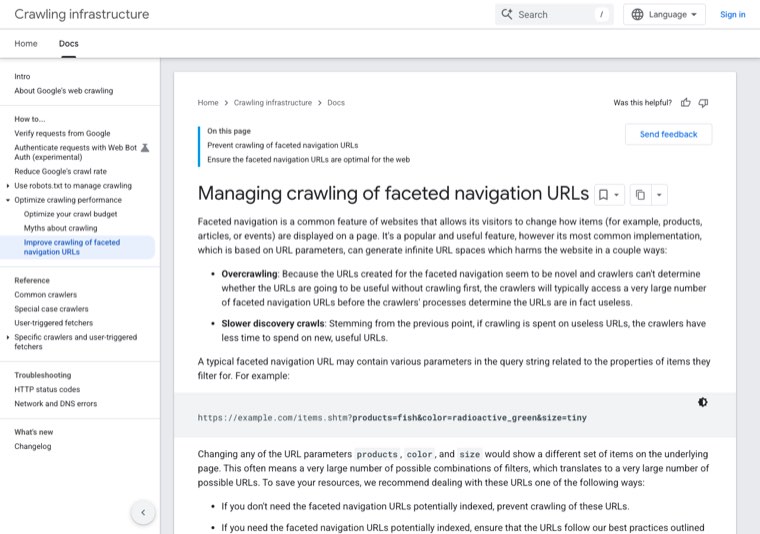
Google's options are to block filter parameters in robots.txt, to use URL fragments for filters, or, where you do want filtered pages indexed, to keep a consistent parameter order and return a 404 for combinations with no results. A workable strategy rule is a demand test: a filter combination earns its own indexable, linked collection page only when it has real search volume and enough products to fill the page. "Black leather boots" might pass. "Black leather boots under $80 in size 7" won't. Everything that fails stays as a filter that isn't crawled.
Rule 3: how URLs and redirects are handled
Write down the URL pattern for each page type, and the rule that any changed or removed URL with traffic or links gets a 301 redirect to the closest match. On Shopify the paths are fixed (/collections/, /products/, /blogs/), so the rule is mostly about handles and redirects.
Plan content that feeds your commercial pages
Content in an ecommerce SEO strategy has one job: capture the searches that happen before a purchase and pass readers and link authority on to collections and products. That rules out a lot of blogging that feels productive.
A good content plan lists, for each planned article, the keyword, the collection or products it supports and the links it will add. Buying guides, comparisons, sizing and fit guides, care guides and "best X for Y" pages usually earn their place. Company news, general lifestyle posts and topics with no product connection usually don't. A realistic cadence for a small team is two to four articles a month, each one mapped to a collection in the keyword map.
Every article should link to at least one collection and one or two products with descriptive anchors, and the collection should link back where it makes sense. That two-way linking is how content helps the pages that make money.
Plan how the store earns links and mentions
Links are the part of ecommerce SEO most stores leave to chance. Product and collection pages rarely attract links on their own, so the strategy needs to name where links will come from. Options that work for stores:
- Brand and manufacturer pages. If you stock brands, many run "where to buy" or stockist pages.
- Gift guides and roundups. Editors and bloggers publish them every season and need products to include.
- Original data. A store sees what people buy, when and in what sizes. Aggregated and anonymized, that makes a story journalists cite.
- Useful tools and guides. Size calculators, care guides and comparison charts attract links that collection pages can't.
- Link exchanges with relevant businesses. Placements from real sites in related niches, set up without paying for links.
Mentions matter too, not only links. AI answers tend to recommend products and stores that appear across reviews, listicles and community discussions, so the authority plan should include getting the store named in those places.
Plan for launches, stockouts and seasons
Stores change constantly, and each change can undo SEO work if nobody decided in advance what happens. Put these rules in the strategy:
| Situation | Rule |
|---|---|
| Product temporarily out of stock | Keep the page live, mark it sold out, keep availability in the markup accurate |
| Product discontinued for good | 301 redirect to the closest replacement or its collection |
| New product or collection launched | Link it from the parent collection and from any related guide on launch day |
| Seasonal sale (Black Friday, summer sale) | Use one permanent URL every year and update the page, rather than a new URL per year |
| Seasonal collection (holiday gifts) | Keep the page live and linked off-season, publish updates 6 to 8 weeks before the peak |
The permanent sale URL is worth singling out. A page like /collections/black-friday that stays live all year keeps the links and history it earned last year. A new page for each year starts from zero every November. If you are late this year, here is our guide to Black Friday SEO when you are starting late.
Prioritize with a simple scoring model
Once the keyword map, structure rules and content plan exist, you will have more work than time. Score each item from 1 to 5 on three factors and sort by the result:
- Impact: search volume times how close the page is to revenue.
- Confidence: how likely the change is to move rankings. Pages already sitting in positions 5 to 20 score high.
- Effort: hours or cost to do it properly.
The score is impact times confidence, divided by effort. Here is how that looks for a made-up outdoor gear store:
| Item | Impact | Confidence | Effort | Score |
|---|---|---|---|---|
| Rewrite the hiking boots collection (ranks position 11) | 5 | 4 | 2 | 10 |
| Block crawling of size and price filter URLs | 3 | 4 | 2 | 6 |
| Buying guide: best hiking boots for wide feet | 4 | 3 | 3 | 4 |
| Unique descriptions for 200 accessory products | 2 | 2 | 5 | 0.8 |
The model is rough on purpose. It stops the team from spending a month on product descriptions for low-margin accessories while the main collection sits on page two.
A 12-month ecommerce SEO roadmap
Most stores can follow the same broad sequence and adjust the details by what the baseline shows.
| Quarter | Focus | Done when |
|---|---|---|
| Q1 | Baseline, keyword-to-page map, structure rules, Merchant Center feed, technical fixes that block crawling or indexing | Every priority keyword has one target URL, the feed has no errors, and filter URLs are handled |
| Q2 | Top 10 to 20 collection pages rewritten, internal links from menus and collections checked, product pages for best sellers improved | Priority collections have unique titles, intro copy and structured links to products |
| Q3 | Content plan running (buying guides and comparisons), first link and mention campaigns, seasonal pages prepared | A steady publishing cadence and first earned links to guides and collections |
| Q4 | Seasonal peak, a review of everything against the baseline, a refresh of the keyword map for next year | Results reported by page type, and a written plan for the next 12 months |
Ecommerce SEO strategy template
Copy this into a document or a spreadsheet and fill in each section. It fits on two pages for a small store, and it is meant to be reviewed every quarter, so keep it short. If you also need a general version that is not specific to stores, with a filled example and a 12-month roadmap, use our SEO strategy template.
| Section | What to write | Example entry |
|---|---|---|
| 1. Goals | One to three measurable goals with dates and a guardrail | Non-brand organic clicks to collections from 3,000 to 7,500 a month by next September, conversion rate above 1.8% |
| 2. Baseline | Clicks, impressions and revenue by page type for the last 3 months | Collections 3,000 clicks, products 1,900, blog 600 |
| 3. Surfaces | Which Google surfaces you target and what each needs | Search, Shopping tab via Merchant Center free listings, Images. No Maps (online only) |
| 4. Keyword-to-page map | Link to the spreadsheet, plus the top 20 keywords and their URLs | "waterproof hiking boots" to /collections/waterproof-hiking-boots |
| 5. Structure rules | Max click depth, filter indexing rule, redirect rule | Products within 3 clicks. Filters indexed only with volume and 12+ products. 301 every removed URL with traffic |
| 6. Content plan | Articles per month, and the collection each one supports | 3 a month: 2 buying guides, 1 comparison, each linked to one collection |
| 7. Authority plan | Where links and mentions will come from | Brand stockist pages, gift guide outreach in Q3, one data story a year |
| 8. Lifecycle rules | Out of stock, discontinued, launches, seasonal URLs | Sold out stays live. Discontinued redirects. One permanent Black Friday URL |
| 9. Priorities | The scored backlog, top 10 items | Scored with impact times confidence divided by effort |
| 10. Roadmap | What each quarter delivers | Q1 foundations, Q2 collections, Q3 content and links, Q4 peak and review |
| 11. Measurement | Reports, owners and review dates | Monthly Search Console check, quarterly review against the baseline |
| 12. Out of scope | What you decided not to do this year | No new blog categories, no indexed price filters, no paid links |
Section 12 is the one people skip and the one that saves the most time. Writing down what you won't do stops the same ideas from being debated every month.
Measure it and review it on a schedule
Split every report by page type, because a store can gain blog traffic while its collection pages lose ground, and a single sitewide number would hide that.
- Monthly: non-brand clicks and impressions for
/collections/and/products/in Search Console, pages that dropped out of the top 10, and Merchant Center feed errors. - Quarterly: organic revenue and conversion rate against the baseline, a check of the keyword map for new pages or conflicts, and a re-scored backlog.
- Yearly: a full rewrite of the goals, surfaces and roadmap.
One detail catches stores out. Google Analytics 4 has a separate Organic Shopping channel next to Organic Search, defined as traffic from a list of shopping sites or from campaigns with "shop" or "shopping" in the name. Merchant Center also reports free listing performance on its own. If you only watch Organic Search, you can miss part of what your product feed earns.
Set expectations on timing as well. Google's SEO Starter Guide notes that some changes are reflected within hours and others take several months. In practice, fixes to pages that already rank on page two tend to show first, and new collections and guides take longer, which is why the roadmap front-loads existing pages.
Running the strategy on autopilot
A strategy document is the easy part. What stalls most stores is the ongoing work it creates: researching keywords every month, writing buying guides and comparisons, publishing them with the right internal links, earning links, and checking whether AI answers mention the store at all.
Distribb runs that work on autopilot. Connect your store and it does the keyword research for the searches your buyers make, writes articles mapped to your collections and products, links them to the pages that sell, and publishes them to your blog on a schedule. It also builds backlinks from real businesses through its exchange network and tracks your visibility in AI answers like ChatGPT and Perplexity. Approving drafts is optional. It doesn't need anyone on your team to manage it.
Pro is $97 a month. Accelerator is $495 a month and adds a human editor who reviews every piece before it goes live. Agencies white-label Distribb for their ecommerce clients, so a store can also go straight to the source. You can see what Distribb runs for ecommerce brands.
That leaves your own time for the decisions only you can make, like which products to push next season.
FAQ
What is an ecommerce SEO strategy?
It is a written plan for how an online store will grow revenue from organic search. It sets goals, maps each target keyword to one page, sets rules for site structure and filters, plans content and links, and defines how results are measured and reviewed.
What should an ecommerce SEO strategy template include?
Goals, a baseline, the Google surfaces you target, a keyword-to-page map, structure rules, a content plan, an authority plan, lifecycle rules for stock and seasons, a scored priority list, a quarterly roadmap, a measurement plan and a list of what is out of scope. The template above has all twelve sections.
How is ecommerce SEO strategy different from regular SEO strategy?
Stores have far more pages that look alike, filter and variant URLs that multiply, products that go out of stock, seasonal peaks, and product data that feeds Google Shopping and AI shopping answers. A general SEO strategy rarely has to plan for any of those. Our piece on AI shopping agents and why Amazon blocked Meta's Muse shows where that last one is heading.
Should category pages or product pages come first?
For most stores, category (collection) pages come first. They target broader searches with more volume, and they pass authority down to products. Product pages come first only when shoppers search for specific models or part numbers.
How long does an ecommerce SEO strategy take to show results?
Improvements to pages already ranking on page two can show within weeks. New collections, guides and link building usually take several months. Plan in quarters and judge the strategy against the baseline after two of them.
Do I need Google Merchant Center as part of SEO?
If you want products to appear in the Shopping tab, Lens or Maps for free, yes. Free listings require a product feed in Merchant Center, and the feed's accuracy affects how products show across Google, so it belongs in the SEO plan.
How often should I update the strategy?
Check the numbers monthly, review priorities quarterly and rewrite the goals and roadmap once a year, ideally after your seasonal peak.