

Most practices that want more patient reviews already have happy patients. What they don't have is a habit of asking. BrightLocal's 2026 survey found that 83% of consumers who were asked to leave a review went on to write one, so the gap between a practice with 40 reviews and one with 400 is mostly a process gap.
This guide walks through that process in nine steps, starting with the Google review link and ending with replies that don't break HIPAA. It also covers the rules from Google and the FTC that decide what you're allowed to do, and it includes scripts you can paste into your appointment texts today.
We checked the 8 pages currently ranking for how to get more patient reviews. Each was scored for three safeguards: the FTC's Consumer Review Rule, HIPAA-safe reply wording, and Google's staff-quota rule. Only 1 page named the FTC rule, only 3 gave an explicit no-confirmation reply technique, and only 1 cited the staff-quota rule. Specific reply wording and a cited rule number, not a one-line disclaimer, are what keep a practice's review responses compliant.
Why patient reviews decide who gets booked
Patients compare practices the way they compare anything else they buy. BrightLocal's Local Consumer Review Survey 2026 (1,002 US adults) puts numbers on it:
- 97% of consumers read reviews for local businesses.
- 47% won't use a business with fewer than 20 reviews.
- 74% only care about reviews written in the last three months, and 18% only look at the last week.
- 31% will only use a business rated 4.5 stars or higher, up from 17% a year earlier.
- 45% now use ChatGPT or another AI tool for local recommendations, up from 6%.
Two things follow from this. A practice needs a steady flow of new reviews rather than one big push, because old reviews stop counting. And review volume now feeds AI answers as well as the map pack, so a practice with a thin profile is less likely to be the one ChatGPT names.
The rules to know before you ask
Three sets of rules apply to a medical practice asking for reviews. Most review campaigns that go wrong break one of them without realising it.
Google's review policy
Google's Maps user-contributed content policy says a business may not:
- Offer incentives such as payment, discounts or free services in exchange for any review, positive or not.
- Selectively solicit positive reviews from patients.
- Discourage or prohibit negative reviews.
- Require or pressure people to write a review while they are on the premises.
- Ask staff to collect a set number of reviews.
That last point matters for practices that run front desk contests. A quota for staff is a policy violation even if every review is genuine.
The FTC's consumer review rule
The FTC's Rule on the Use of Consumer Reviews and Testimonials (16 CFR Part 465) took effect on 21 October 2024. It bans fake reviews, bans incentives that are conditioned on the review being positive, bans suppressing negative reviews, and requires employees and insiders to disclose their connection if they review the business. Civil penalties apply per violation, so a gated campaign that runs for months adds up quickly.
HIPAA and your replies
Asking for a review is low risk. Replying is where practices get fined. A patient posting about their visit does not give you permission to confirm they are a patient. The HHS Office for Civil Rights settled with Manasa Health Center for $30,000 after its replies to negative Google reviews mentioned patients' diagnoses, and with New Vision Dental for $23,000 over replies to Yelp reviews. The reply templates further down are written to avoid both mistakes.
How to get more patient reviews in 9 steps
1. Get your Google review link and QR code
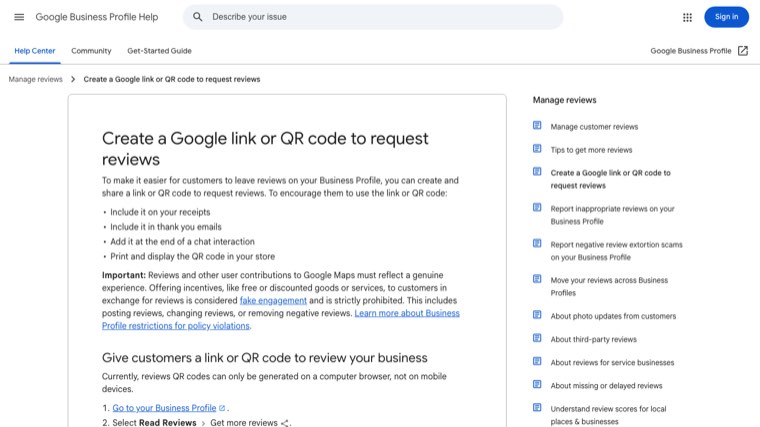
Everything else depends on a link that drops a patient straight onto the review form. Google generates one for you. Sign in to your Business Profile, select Read reviews, then Get more reviews, and copy the link. The QR code is on the same screen, but Google only generates it in a desktop browser, not on a phone.
2. Pick one or two review sites to focus on
Spreading requests across six sites gives you a handful of reviews on each and a strong profile nowhere. Google comes first for almost every practice: 45% of consumers wrote a Google review in the past year, against 34% for Facebook and 24% for Yelp. Add a second site only if patients in your specialty use it, such as Healthgrades for physicians or Zocdoc if you take bookings there. Once Google has a healthy count, rotate the second site into your requests.
3. Put the link in the text you already send
Your scheduling or EHR system almost certainly sends appointment reminders by text. Most can also send a message after the visit is checked out. Add a short thank-you with the review link to that message, so every patient gets the same request without anyone at the front desk remembering to do it.
Timing matters. Send it the same day for routine visits, while the appointment is fresh. For procedures or visits with a recovery period, a message two or three days later reads better than one that arrives while the patient is still sore. Keep the patient's name out of the link and keep any clinical detail out of the message.
4. Ask in person, at a natural moment
A spoken request makes the text that follows feel expected rather than automated. The best moment is when the patient says something positive, often at checkout or at the end of a follow-up. Something like "We'd really appreciate it if you shared your experience online, you'll get a text with the link" works. Hand over a small card with the QR code to take home.
Don't ask them to write it at the desk or pass them a tablet in the waiting room. Google's policy bars pressuring people to review while they're on the premises, and a patient being watched won't write an honest review anyway.
5. Ask every patient, not just the happy ones
Review gating means asking "How was your visit?" first and only sending the public review link to people who answer positively. It's tempting and it's against Google's policy and the FTC rule. Send the same invitation to every eligible patient.
You can still give patients a private way to raise a concern. Offer it alongside the public link, never instead of it. "If anything could have gone better, reply to this text and our practice manager will call you" gives an unhappy patient a faster route to a fix without blocking their review.
6. Make it short and easy
Patients assume a review has to be long and well written. BrightLocal found a long, detailed review is the factor consumers care about least (26%), behind whether the review is recent (44%) and whether the owner replied (37%). Tell patients a sentence or two is plenty. Use one link, one tap, and no login screens you can avoid.
7. Reply to every review within a week
Replies bring in more reviews, because patients see that someone reads them. In the same survey, 80% of consumers said they're likely to use a business that responds to all its reviews, 81% expect a reply within a week, and 50% are put off by generic, templated replies. Reply to the positive reviews too, and vary the wording.
Keep every reply free of anything that confirms the reviewer is a patient: no names of treatments, no dates, no "we're glad your knee is better". The templates below show the pattern.
8. Keep the flow steady and watch for problems
A burst of 50 reviews in one week followed by silence looks odd to patients and does nothing for the "last three months" group. Automated post-visit texts solve most of this. Once a week, check four numbers: requests sent, new reviews, average rating, and replies outstanding.
If you get a wave of one-star reviews from people who were never patients, or someone demands payment to remove bad reviews, report it through your Business Profile. Google has a specific process for negative review extortion scams. Don't reply to those reviews in a way that argues about whether the person was treated.
9. Turn reviews into bookings
Reviews persuade, but patients rarely book straight from the profile. BrightLocal found 54% of consumers visit the business's website after reading positive reviews, and 66% do more research before booking. That means the service pages on your site have to answer the questions a new patient still has: what the visit involves, whether you take their insurance, and how to book. Our guide on how to get more patients covers the rest of that path, from being found to the first appointment.
How to get more patient reviews on Google
Google reviews carry the most weight for local search and for the AI summaries Google shows above reviews, so it's worth doing a few Google-specific things well:
- Complete the profile first. Pick the most specific primary category, list your services, keep hours accurate including holidays, and add real photos. A patient who lands on a half-finished profile is less likely to leave a review.
- Use Google's link, not a search. Telling patients to "find us on Google" loses most of them. The link from step 1 opens the review form directly.
- Put the QR code where patients wait after the visit, such as on the checkout counter card or on printed aftercare instructions, not on a sign demanding a review.
- One profile per location. A group practice with three offices should have three profiles and three review links, so reviews land where patients will read them.
- Reply as the owner from the profile so the reply shows under your practice name.
This short walkthrough from RepuGen covers the same Google steps on screen:
Review request scripts you can copy
Swap in your practice name and link. None of these mention a condition or a treatment, and none of them ask for a positive review.
Text message after the visit
"Thanks for visiting [Practice] today. If you have a minute, we'd appreciate you sharing your experience on Google: [link]. A sentence or two is plenty. If anything could have gone better, just reply here and we'll call you."
Email version
Subject: How was your visit to [Practice]?
"Thank you for choosing us. Reviews help other people in [town] find the right practice, and we read every one. You can leave yours here: [link]. If you'd rather tell us something privately, reply to this email and it goes straight to our practice manager."
In person at checkout
"We're glad today went well. You'll get a text with a link to leave us a Google review, if you're happy to. It really helps other patients find us."
HIPAA-safe reply templates
Each of these acknowledges the review without confirming the person is a patient. Rotate and personalise them so they don't read as copied.
| Review type | Reply that works | Avoid |
|---|---|---|
| 5-star, general | "Thank you for taking the time to share this. Our team works hard to make every visit a good one, and it means a lot to hear." | "Glad your treatment went well, see you at your next appointment." |
| 5-star, names a staff member | "Thank you, we'll make sure Maria sees this. Kind words like these make the team's week." | Repeating any detail about the visit the reviewer gave. |
| 1-2 stars, service complaint | "We're sorry to read this. We take feedback seriously and would like to understand more. Please call our practice manager at [number] so we can talk directly." | "Our records show you arrived 20 minutes late." |
| 1-2 stars, clinical complaint | "We're sorry you feel this way. Privacy rules prevent us from discussing any individual's care online, but we'd welcome a call at [number]." | Explaining or defending the care decision in public. |
| Review from someone who was never seen | No reply, or a short general one. Report it through your Business Profile. | "We have no record of you as a patient." |
The last row catches practices out. Saying someone is not a patient implies you checked your records, and for real patients the opposite statement is a disclosure. Our guide to HIPAA compliant marketing covers the wider privacy rules for texts, emails and your website.
Where Distribb fits
Asking for reviews is quick once the text is set up. The slower work is everything around the reviews: replying to each one within a week, keeping the Business Profile active, publishing the service pages patients check after reading reviews, and making sure AI tools have enough about your practice to recommend it.
Distribb runs that on autopilot. Connect your practice website and your Google Business Profile, and it pulls in new Google reviews as they land, drafts a reply in your practice's voice for each one so answering takes a click, and queues Google Business posts from your new content. On the search side it does the keyword research, writes and publishes service pages and articles, builds backlinks from real businesses, and tracks whether ChatGPT, Perplexity and Google's AI answers mention you. Pro is $97 a month. Accelerator is $495 a month and adds a human editor who checks every piece before it goes live. You can see what Distribb runs for healthcare practices.
The post-visit review request itself stays in your scheduling system, where the appointment data already lives.
FAQ
How do I get more patient reviews on Google?
Copy your review link from your Google Business Profile (Read reviews, then Get more reviews), add it to the text or email your scheduling system sends after each visit, and ask patients in person at checkout. Send the request to every patient, reply to every review within a week, and keep the profile complete and up to date.
Can a medical practice offer an incentive for reviews?
Not on Google. Google's policy bans incentives of any kind in exchange for a review, even when the review can be negative. The FTC rule separately bans incentives that depend on the review being positive. The safe approach is no incentives at all.
How many reviews does a practice need?
Enough to clear the thresholds patients use. BrightLocal found 47% of consumers won't use a business with fewer than 20 reviews, and 74% only look at reviews from the last three months. A practice with 20 or more reviews and several new ones each month is in a good position. Past that, compare your count with the practices ranked around you in the map pack.
Can doctors reply to negative reviews?
Yes, and they should, but without confirming that the reviewer is a patient or mentioning any detail of care. Apologise in general terms, say privacy rules prevent discussing individual care online, and give a phone number. OCR has fined practices $23,000 and $30,000 for replies that disclosed patient information.
Can staff leave reviews for the practice?
They shouldn't. The FTC rule requires insiders who review a business to disclose that connection, and Google treats reviews from employees as a conflict of interest. Staff can help by asking patients, but they shouldn't be given review quotas, which Google's policy also prohibits.
Conclusion
Getting more patient reviews comes down to a link, a habit and a reply. Set up the post-visit text with your Google review link this week, ask every patient the same way, and answer every review within seven days without mentioning anything about their care. Then check the numbers weekly. Within a couple of months, a practice that used to get a review a month can be getting several a week, most of them recent enough for patients to count.