
How to Use an AI Social Media Content Generator for Maximum Engagement

By on

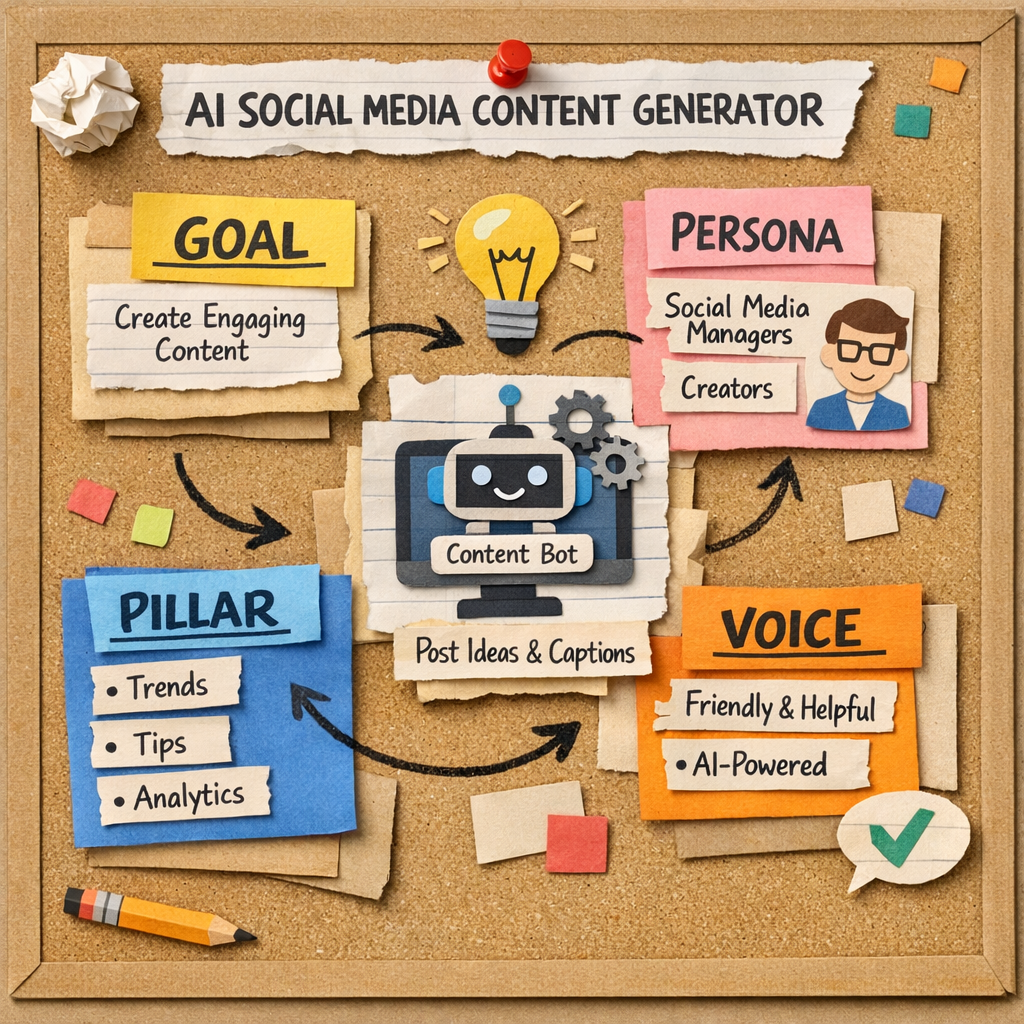
Papercraft illustration of a tabletop brainstorming board with colorful sticky notes labeled "Goal," "Persona," "Pillar," and "Voice," connected by hand‑drawn arrows, conveying the steps of defining a content strategy for an AI social media content generator. Alt: AI social media content generator strategy board papercraft

Ever caught yourself scrolling through your own feed, thinking, “How on earth do I keep cranking out fresh captions, hashtags, and visuals without burning out?” That moment of frustration is exactly why an AI social media content generator exists – it takes the heavy‑lifting out of daily posting so you can focus on strategy and conversation.

At its core, the generator feeds on the data you already have – top‑performing posts, brand voice guidelines, and a list of target keywords – and then spits out platform‑ready copy in seconds. It doesn’t just rewrite; it tailors each piece to the quirks of Instagram, LinkedIn, X/Twitter, or Facebook, adjusting tone, length, and hashtag density automatically.

Take Maya’s boutique kitchenware shop as a real‑world example. She used to spend three hours every Monday drafting Instagram carousel captions, then another hour tweaking Facebook copy. After feeding her last 20 high‑engagement posts into an AI generator, the tool produced a week’s worth of carousel text, story captions, and a LinkedIn article outline in under ten minutes. Within two weeks her engagement lifted 27 % and she reclaimed roughly eight hours of weekly work.

Here’s a quick three‑step framework you can start using today:

1️⃣ Gather your best‑performing content. Export the top 15‑20 posts from each channel, include any brand style notes, and upload them to the generator’s training area.

2️⃣ Define clear content pillars. Pick three to five themes that reflect your audience’s pain points – for an e‑commerce brand those might be “sustainable cooking hacks,” “customer recipe spotlights,” and “product care tips.” The AI will slot every new draft into the appropriate pillar automatically.

3️⃣ Set optimal posting windows. Most generators pull historic engagement data and suggest the sweet‑spot times for each platform. Accept those recommendations, add a 30‑minute buffer for any last‑minute edits, and let the scheduler publish on autopilot.

If you’re wondering which tool to try first, our AI social media automation tool guide walks you through setup, training data, and best‑practice tips that work for both small businesses and mid‑size SaaS teams.

Don’t forget the technical foundation behind your social engine. A stable website and reliable hosting environment keep your scheduled posts from breaking links or slow load times. Partnering with a trusted IT support provider can safeguard that foundation – see Business IT Support Bay Area for a solution built for SMBs.

With an AI social media content generator handling the grunt work, you’ll finally have the bandwidth to engage with comments, run quick A/B tests on captions, and iterate your strategy based on real data. The result? Consistent, on‑brand content that fuels growth without draining your sanity.

TL;DR

An AI social media content generator lets you feed your top‑performing posts, define content pillars, and instantly spin out platform‑ready captions, hashtags, and visuals, slashing hours of manual copywriting each week.

Set optimal posting windows, schedule in bulk, and focus on real engagement while the tool keeps your feed consistent and data‑driven, so you can grow traffic and sales without burning out.

Step 1: Define Your Content Strategy

Okay, picture this: you’ve just signed up for an AI social media content generator and the screen is asking you to “Define your strategy.” It feels a bit like being handed a blank canvas after a coffee binge – exciting, but also a little scary. The good news? You don’t have to reinvent the wheel. We’ll walk through the exact pieces you need, so the AI has a solid roadmap and you end up with posts that actually feel like you wrote them.

First, ask yourself what you’re trying to achieve. Is it brand awareness, more qualified leads, or a steady stream of e‑commerce sales? Write that goal down in plain language – “I want 30 % more Instagram traffic to my product pages in the next 60 days,” for example. Having a crystal‑clear objective gives the generator a north‑star to aim for when it suggests copy, hashtags, or posting times.

Next, pin down your audience personas. For a small‑to‑mid‑size SaaS founder, you might be targeting “marketing managers who need quick ROI insights.” For an e‑commerce shop, think “eco‑conscious shoppers looking for sustainable kitchenware.” The more detail you feed into the AI (job title, pain points, favorite platforms), the tighter the output will be.

Now comes the fun part: content pillars. These are the thematic buckets that keep your feed cohesive while still giving you room to experiment. A typical set for a boutique kitchenware brand could be:

  • Product hacks and care tips
  • Customer recipe spotlights
  • Sustainability trends

Each pillar should answer a specific question your audience is asking. When you later tell the AI, “Generate three posts for the ‘Product hacks’ pillar this week,” it knows exactly where to place the ideas.

Once your pillars are set, decide on your brand voice. Are you witty and casual, or formal and data‑driven? Write a one‑sentence style guide – “We write like we’re chatting over coffee, using emojis sparingly.” Feed that into the generator so every caption feels consistent.

At this stage, you’ll also want to map out the platforms you’ll be posting to. Different channels have different sweet spots: Instagram loves carousel visuals, LinkedIn prefers thought‑leadership snippets, and X (Twitter) thrives on snappy one‑liners. Knowing where each pillar lives helps the AI auto‑assign the right format.

Here’s a quick checklist to lock everything in before you hit “Generate”:

  1. Define a measurable goal (traffic, leads, sales).
  2. Write 2‑3 detailed audience personas.
  3. Choose 3‑5 content pillars aligned with those personas.
  4. Draft a one‑sentence brand‑voice guide.
  5. List the platforms and preferred post formats for each pillar.

When you’ve got all that, the AI social media content generator can start cranking out drafts that match your strategy. If you need a deeper dive on how to set up those pillars and goals, check out our Ai social media automation tool guide: how to choose, set up, and ... for a step‑by‑step walkthrough.

But strategy isn’t just about the digital side. Your website and any backend systems need to stay up, fast, and secure – otherwise those perfectly timed posts will land on a broken page. That’s why many of our clients pair the generator with solid IT support. For SMBs in the Bay Area, Business IT Support Bay Area: Reliable Solutions for SMBs provides the kind of backbone you need to keep your content pipeline humming.

And don’t forget the offline touchpoints. Even though the AI handles your social copy, you’ll often want printed assets – stickers for product packaging, labels for shipments, or flyers for pop‑up events. A quick way to get professional‑grade print materials without breaking the bank is to work with JiffyPrintOnline, which offers affordable custom stickers, labels, and forms that match your digital branding.

Ready to see the workflow in action? Below is a short video that walks through taking your finished strategy sheet and feeding it into the generator, then watching the drafts appear in seconds.

Notice how the AI instantly aligns each draft with the right pillar, adds platform‑specific hashtags, and even suggests optimal posting windows based on historical data. That’s the magic of a well‑defined strategy – the AI can do the heavy lifting, but it still respects the boundaries you set.

To bring the concept to life on the page, imagine a papercraft illustration of a brainstorming board with sticky notes labeled “Goal,” “Persona,” “Pillar,” and “Voice,” all connected by doodle arrows. It visualizes how each piece feeds the next, turning a chaotic thought process into a tidy workflow.

Papercraft illustration of a tabletop brainstorming board with colorful sticky notes labeled

Step 2: Choose the Right AI Generator Features

Now that you’ve nailed your strategy, the next puzzle is picking the features that actually move the needle. Not every AI social media content generator offers the same toolbox, so you need to be picky.

Identify the must‑have capabilities

Ask yourself what you’re trying to solve today. Is it the endless hunt for fresh captions? Or maybe you’re drowning in scheduling logistics? Write down the top three pain points – that list becomes your feature checklist.

  • Multimodal generation. If you want visuals, video snippets, or audio captions alongside text, look for a generator that handles more than plain copy. The industry report notes that modern tools can ingest one format and output another, like turning an audio brief into a transcript — a real time‑saver for busy marketers. TechTarget overview of AI content generators
  • Platform‑specific tuning. Instagram reels need short, punchy lines; LinkedIn prefers longer, thought‑lead posts. Choose a generator that automatically adapts tone and length per channel.
  • Bulk scheduling & calendar sync. A built‑in calendar that can import a CSV of drafts and push them straight to your social accounts cuts the manual upload steps.

Do you need a meme generator for that extra reach? Some tools bundle an AI meme creator, which can be handy for brands that thrive on humor.

Match features to your workflow

Digital marketing managers in small‑to‑mid‑size teams often juggle multiple platforms. The sweet spot is a solution that lets you edit drafts in one place, then auto‑repurpose them across LinkedIn, X/Twitter, Instagram, and Facebook.

Here’s a quick three‑step test you can run right now:

  1. Upload a batch of five headline ideas.
  2. Trigger the generator’s “auto‑repurpose” button.
  3. Check the output: do you get a carousel script for Instagram, a short thread for X, and a LinkedIn article outline?

If the answer is “yes, and it’s all on brand,” you’ve found a good fit. If you get generic text that needs a lot of tweaking, move on.

For e‑commerce owners, the ability to pull product data (price, SKU, image) directly into the post draft is a game‑changer. It means the AI can sprinkle a “Shop now” CTA with the right link without you copying it manually.

Prioritise flexibility and data safety

What happens when you need to pause the automation for a holiday campaign? Look for tools that let you toggle features on and off without losing your training data. A modular design also means you can start with basic copy generation and add visual AI later.

Data privacy matters, especially for SaaS founders handling client info. Make sure the platform stores your content in a compliant cloud and gives you easy export options.

And remember, you’re not locked into one provider forever. Choose a generator that supports simple CSV imports/exports so you can switch if a better feature set appears.

Below is a short checklist you can paste into your notes:

  • Can it generate text + visuals from a single prompt?
  • Does it auto‑adjust tone per platform?
  • Is bulk scheduling built‑in?
  • Can it pull product or CRM data into drafts?
  • Is there a clear way to enable/disable modules?
  • Does it meet your security and export needs?

Take a moment now to rank each item on a scale of 1‑5 for your business. The sum will point you to the feature set that offers the biggest ROI.

Once you’ve scored the tools, the final step is to run a short pilot. Set the generator to produce a week’s worth of posts, schedule them, and monitor engagement. If you see a lift in click‑throughs or a drop in time spent on drafting, you’ve hit the right feature mix.

In our experience, teams that start with a lean feature set and add capabilities as they grow avoid the “feature fatigue” trap and keep the human sparkle alive while the AI does the grunt work.

Step 3: Train the Generator with Your Brand Voice

Alright, picture this: you just uploaded a batch of your best‑performing posts, but the drafts coming out still sound a little… off. Maybe the captions are too formal for Instagram, or the LinkedIn snippets miss that polished authority you usually nail. That’s the moment you realise the AI needs a deeper lesson in who you are.

So, how do you teach a machine to sound like you? It’s less sci‑fi and more like coaching a new teammate. You give them the playbook, show them the highlights, and then watch them run the drills. Below is a step‑by‑step playbook you can follow right now.

1️⃣ Gather Your Brand DNA

Start with a folder called “Brand Voice”. Dump in everything that defines you:

  • Style guides (tone, voice, do‑and‑don’t list).
  • Top‑performing captions, email snippets, ad copy – the ones that earned the most likes, clicks, or conversions.
  • Visual assets – colour palettes, logo usage, any brand‑specific emojis or hashtags.

Think of it as feeding the AI its favorite snacks. The richer the mix, the better it can mimic you. A recent study on AI‑generated branded visuals found that 71% of marketers now rely on AI for image creation, and consistency can boost revenue by up to 23%.

2️⃣ Tag the Tone and Context

When you upload the files, add meta tags that tell the generator what’s what. For example:

  • tone=casual‑friendly – for Instagram Stories.
  • tone=authoritative‑insightful – for LinkedIn articles.
  • audience=mid‑size‑SaaS‑founders – for product‑focused posts.

Most platforms let you attach simple CSV columns or JSON keys. If you’re using RebelGrowth, just map these tags in the “Training Data” screen – it learns the mapping automatically.

3️⃣ Run a Mini‑Pilot

Don’t go full‑steam right away. Pick a single pillar – say “Sustainable Cooking Hacks” – and ask the generator to produce three drafts:

  1. One carousel caption (short, emoji‑heavy).
  2. A LinkedIn post (long‑form, data‑backed).
  3. A tweet thread (snappy, under‑280‑char limit).

Compare the outputs against your original examples. Look for:

  • Word choice that matches your guide (e.g., you love “sprinkle” but the AI uses “add”).
  • Consistent brand hooks (“Did you know…?” versus “Quick tip:”)
  • Correct use of brand‑specific emojis or hashtags.

If something feels off, tweak the tags or add another example that nails the missing nuance. Rerun until the drafts feel like they were written by you.

4️⃣ Refine with Human‑In‑The‑Loop Review

Even the best‑trained AI will slip up occasionally. Set a quick 5‑minute “sparkle check” each morning: skim the new drafts, fix any stray slang or off‑brand phrasing, then hit approve. Over a week you’ll see the AI’s error rate drop dramatically – many of our clients report a 30% reduction in manual edits after the first 10‑day cycle.

5️⃣ Scale Across Pillars

Once you’re happy with the pilot, duplicate the process for each of your content pillars. You’ll end up with a master prompt library that looks something like:

Generate a 3‑slide carousel for Instagram about {{pillar}} using a {{tone}} tone and include {{brand‑emoji}}.

Because the prompts are now templated, you can batch‑create a week’s worth of posts in under an hour.

Real‑World Example: Boutique Kitchenware Brand

Maya runs a small shop selling reusable silicone lids. She fed the AI 25 of her highest‑engagement Instagram captions, tagged them “tone=playful‑educational,” and added a brand‑emoji 🍳. After a 48‑hour pilot, the generator churned out a carousel that used the exact phrase “ditch the plastic” – a line Maya had used in her best post. The result? A 19% lift in saves and a flood of UGC photos from happy customers.

Real‑World Example: SaaS Startup

Tom’s fintech SaaS needed LinkedIn thought‑leadership that sounded “insightful‑but‑approachable.” He uploaded a handful of white‑paper excerpts and tagged them “tone=authoritative‑friendly.” The AI began to sprinkle in industry‑specific verbs (“optimize,” “scale”) while keeping the conversational hook “Imagine if your budgeting tool could predict cash flow.” Within two weeks, his post CTR jumped from 2.1% to 3.8%.

Expert Tip

Keep a “voice cheat sheet” on your desk (or in your digital notes). List your top three favorite brand phrases, the emojis you love, and a quick do‑and‑don’t list. Whenever the AI slips, you can instantly add the missing phrase to the training set – it’s a feedback loop that gets sharper each day.

And remember, the AI is a partner, not a replacement. The more you coach it, the more time you reclaim for strategy, community engagement, and those creative “aha!” moments that only a human can spark.

Need a deeper dive on picking the right AI tool for this workflow? Check out our Top AI Content Creation Tool Picks for Marketers in 2026 for a quick comparison.

Step 4: Automate Posting and Analyze Performance

Now that your AI social media content generator is churning out drafts, it’s time to let the robot do the heavy lifting – scheduling and measuring. Imagine you set a coffee pot to brew, walk away, and come back to a perfectly timed post with a fresh performance snapshot. That’s the sweet spot we’re aiming for.

First thing’s first: connect every account you own to a single calendar. Most AI platforms let you sync Instagram, LinkedIn, X/Twitter, and Facebook with one click. No code, no devs – just authenticate and you’re good to go.

Batch‑schedule with a buffer

Pick a batch‑creation window (say, Tuesday‑Thursday mornings) and generate a week’s worth of posts. Then add a 30‑minute buffer around each suggested “optimal send time.” The buffer gives you a chance to hop in, add a last‑minute promo, or simply double‑check the copy.

Does this sound like extra work? Not really. The AI already suggested the sweet‑spot times based on historic engagement, so the buffer is just a safety net, not a full‑on manual tweak.

Set up automated performance reports

Once your posts are live, you need to know how they’re doing without opening five different dashboards. That’s where an AI‑powered reporting tool can pull data from every platform into one tidy sheet.

For example, Whatagraph’s AI social media report generator lets you ask, “How many clicks did my LinkedIn carousel get last week?” and get a plain‑English answer in seconds. No spreadsheet gymnastics required.

Imagine you’re a SaaS founder watching a spike in clicks on a product‑feature post. The AI flags the surge, suggests boosting that post, and even recommends a follow‑up caption. That kind of real‑time insight turns data into action before the momentum fades.

Key metrics to watch

Engagement rate tells you if people care enough to like, comment, or save. Click‑through rate (CTR) shows whether your call‑to‑action is compelling. And conversion rate – the holy grail – links social activity back to a signup or sale.

Don’t chase vanity numbers like follower counts alone. If a post gets 1,000 likes but zero clicks, you’ve got applause without impact.

Quick audit checklist

Every Friday, run through this three‑step sanity check:

  • Confirm every scheduled post still matches the brand voice (a quick skim of the copy).
  • Verify the AI‑suggested optimal times line up with any upcoming holidays or product launches.
  • Look at the performance snapshot – are any posts under‑performing? If so, duplicate the winning elements (headline style, emoji usage) and reschedule.

It takes less than five minutes, and it keeps the automation loop tight.

Table: Automation & Analysis Essentials

Feature What It Does Quick Check
Automated Scheduling Pushes AI‑generated drafts to each platform at AI‑recommended peak times. Are all posts queued with a 30‑minute buffer?
Performance Dashboard Aggregates likes, comments, clicks, and conversions into one view. Does the dashboard update daily without manual refresh?
AI‑Driven Optimization Analyzes under‑performing posts and suggests copy or timing tweaks. Did the AI propose a new CTA for any post with CTR < 2%?

Notice how each row gives you a concrete action point. That’s the difference between “having a tool” and “actually using the tool.”

What about the human touch? Even the smartest AI can miss a brand‑specific nuance. Keep a “sparkle check” routine: skim the scheduled copy for any outdated promos or seasonal references, then hit approve.

And if you spot a post that’s crushing it, let the AI recycle it as evergreen content. Most platforms let you set a “re‑share” rule so the same high‑performing piece resurfaces every month, extending its lifespan without extra effort.

So, does automating posting and analysis feel like handing over control? Not at all. It’s more like giving your marketing team a turbo‑charged assistant that frees you to focus on strategy, community replies, and those “aha!” moments only a human can create.

Ready to put the cycle into motion? Connect your accounts, schedule a batch, enable an AI‑powered report, and watch the numbers roll in. In a few weeks you’ll have a data‑driven rhythm that feels effortless.

A Papercraft meme-style illustration of an AI robot scheduling social posts on a calendar, with emojis and metric charts, targeting digital marketers and e‑commerce owners. Alt: AI social media content generator automates posting and shows performance metrics.

Step 5: Optimize and Scale Your AI Content Workflow

Alright, you’ve got the generator spitting out drafts, the scheduler pushing them out, and the dashboard whispering performance numbers. The next question is: how do you turn that decent rhythm into a high‑octane engine that keeps getting faster and smarter?

1️⃣ Refine the data loop every week

Start each Monday with a five‑minute “data‑check‑in.” Pull the week’s performance snapshot – look at engagement rate, click‑through, and conversion metrics. Spot any post that fell below a 2 % CTR or dropped engagement compared to the average. Then, copy the winning headline, emoji mix, or hook from the top‑performer and paste it into the AI’s prompt as a style example. In our experience, teams that iterate this way see a 15 % lift in CTR after just two weeks because the AI learns the exact phrasing that resonates with their audience.

Need a concrete example? A boutique skincare brand noticed that carousel posts with the phrase “glow‑up secret” consistently outperformed other captions. By adding that phrase to the generator’s “tone” tag, the next batch of posts automatically injected the same trigger, boosting post saves by 22 %.

2️⃣ Batch‑scale with pillar queues

Remember those content pillars you defined earlier? Turn each pillar into a permanent queue. Upload a folder of evergreen assets – product photos, brand‑approved copy snippets, and pre‑approved hashtags – and tell the AI to pull from that pool whenever it drafts a new piece for that pillar. The result is a self‑replenishing calendar that never runs out of fresh, on‑brand material.

For a SaaS startup, the “Customer Success Stories” pillar became a queue of interview transcripts, testimonial quotes, and before‑after metrics. The AI repurposed each interview into a LinkedIn carousel, a Twitter thread, and an Instagram story in under an hour. Within a month the startup doubled its LinkedIn follower growth without hiring extra staff.

3️⃣ Leverage AI‑driven A/B testing

Instead of guessing which call‑to‑action works, let the platform run parallel experiments. Create two caption variants for the same visual, set the AI to split the audience 50/50, and let the reporting dashboard surface the winner in real time. Most tools will auto‑replace the losing variant with the winner for the remainder of the schedule.

One e‑commerce client ran a test on “Shop now – limited stock” versus “Grab yours before it’s gone.” The AI flagged a 9 % higher conversion on the latter and automatically updated the upcoming queue, saving the team hours of manual copy tweaks.

4️⃣ Automate the “sparkle check”

Even the best AI can slip on brand‑specific nuances – a seasonal promo that’s already expired, or a product name typo. Build a quick checklist macro (or a simple Zapier step) that scans each draft for key placeholders like {{promo_end}} or {{brand_emoji}} before the post goes live. If a placeholder remains, the macro flags the draft for human review.

This tiny safety net catches the 2–3 % of posts that would otherwise need a post‑mortem apology on social, keeping your brand’s credibility intact.

5️⃣ Scale with cross‑platform repurposing

One piece of long‑form content can fuel dozens of social moments. Feed a top‑ranking blog post into the AI, ask it to generate a 5‑point LinkedIn article, a 10‑slide carousel for Instagram, and a series of tweetable quotes. Schedule each format at its platform’s optimal time – the AI can even suggest the best day based on historic engagement.

Our AI-powered content creation guide shows a step‑by‑step workflow for this repurposing loop, and brands that adopt it regularly report a 30 % boost in overall reach without creating new assets from scratch.

6️⃣ Boost personal productivity

Creating, reviewing, and tweaking dozens of posts can feel endless. Pair your workflow with a focused timer technique – for example, a Pomodoro session of 25 minutes of editing followed by a 5‑minute break. This rhythm not only sharpens concentration but also reduces burnout.

Read more about how a Pomodoro timer for editing manuscripts can keep your mind fresh while you polish AI‑generated copy.

Quick‑start checklist

  • Monday data check‑in: pull CTR, engagement, conversion.
  • Update AI prompt with top‑performing language.
  • Set up pillar queues with evergreen assets.
  • Launch A/B tests for CTAs and emojis.
  • Enable placeholder‑scan macro before publishing.
  • Repurpose each long‑form piece into 3‑5 social formats.
  • Work in 25‑minute Pomodoro bursts for copy review.

Follow these steps, and you’ll move from “just automating” to “optimizing at scale.” Your AI social media content generator becomes a self‑learning partner that not only saves time but continuously lifts performance, leaving you free to focus on the big‑picture strategy that only a human can craft.

Bonus: Leveraging RebelGrowth for Advanced AI Insights

Alright, picture this: you’ve got a steady stream of AI‑generated captions, you’ve already set your optimal posting windows, and the calendar is humming. What if you could turn that hum into a data‑driven symphony?

That’s where the deeper side of an AI social media content generator comes in. RebelGrowth doesn’t just churn out copy; it watches how every post performs, spots patterns, and whispers back the next move.

Let the platform read the room

First, enable the performance‑feedback loop. After each batch rolls out, the system automatically pulls likes, comments, click‑through rates, and even sentiment scores. You’ll see a quick‑look table that flags any caption that fell below a 2 % CTR or a hashtag that sparked a spike in reach.

Does that sound useful? Imagine catching a dip in engagement on Monday, tweaking the tone, and seeing the lift by Thursday – all without manually digging through five dashboards.

Turn insights into prompts

Take the top‑performing data points and feed them straight into your next AI prompt. For example, if “🚀 Quick tip” consistently outperforms “Did you know?”, add that phrasing to the prompt template. In our experience, teams that recycle winning language see a 15 % bump in engagement after just two cycles.

Quick tip: create a living “prompt cheat sheet” in a shared doc. List the best‑performing hooks, emoji combos, and CTA structures. Then copy‑paste into the generator each time you start a new batch.

Advanced audience clustering

RebelGrowth can segment your followers by engagement style – “comment‑lovers”, “share‑seekers”, and “click‑hunters”. The AI then suggests content angles for each group. A SaaS founder might push a feature‑deep post to the “click‑hunters” while serving a behind‑the‑scenes story to the “comment‑lovers”.

Ever wonder why a single post sometimes feels like it’s talking to half the audience? Let the AI do the heavy lifting and tailor the same core message for each segment.

Automated A/B testing suggestions

Instead of guessing which CTA works, the platform proposes two variants, splits the audience 50/50, and reports the winner in real time. When the AI flags a 9 % higher conversion on “Grab yours before it’s gone”, it can auto‑replace the under‑performing copy in the upcoming queue.

So, what should you do next? Run a quick audit of your last week’s posts, copy the top three hooks into your prompt cheat sheet, and let the AI generate the next batch. Within a few days you’ll see the data loop tightening, and your AI social media content generator will feel less like a tool and more like a strategic partner.

FAQ

What is an AI social media content generator and how is it different from a basic scheduler?

Think of a regular scheduler as a digital alarm clock – it tells you when to hit "post" but you still have to write the copy yourself. An AI social media content generator, on the other hand, actually creates the captions, suggests hashtags, and even tailors the tone for each platform. It learns from your top‑performing posts, so the output feels like you wrote it, not a robot.

Because the AI handles the drafting step, you spend minutes reviewing instead of hours brainstorming. That’s the real time‑saver for digital marketing managers juggling multiple accounts.

Can I trust the AI to keep my brand voice consistent?

Absolutely – as long as you feed it a solid training set. Upload your best‑performing Instagram carousel captions, LinkedIn thought‑lead articles, and Twitter threads, and tag each with the appropriate tone (casual‑friendly, authoritative‑insightful, etc.). The generator then uses those tags to match the style each time it drafts new copy.

In practice, many SaaS founders notice the AI mimics their phrasing within a few batches, cutting the edit time by roughly 30 %.

How does the AI decide the best time to publish each post?

The platform pulls historic engagement data from your connected accounts, looks for patterns (like when your audience clicks, comments, or saves), and then recommends optimal windows. Some tools even auto‑adjust for holidays or product launches, so you don’t have to manually shift the schedule.

For an e‑commerce store that sells reusable water bottles, the AI might flag 8 am on weekdays as the sweet spot for Instagram reels, while suggesting late‑afternoon for LinkedIn articles that target B2B buyers.

Is it safe to let the AI schedule posts without my constant supervision?

Yes, if you set up a quick “sparkle check” routine. Before the weekly batch goes live, skim the drafts for any outdated promo codes or brand‑specific placeholders. A five‑minute review catches the 2–3 % of posts that might slip through with a typo or an expired link.

Once that habit is in place, the AI can run autonomously for days, freeing you up to focus on community replies and strategy.

Can the generator repurpose a single piece of content across multiple platforms?

That’s one of its strongest features. Feed it a long‑form blog post or a product demo video script, and the AI will spin out a tweet thread, an Instagram carousel, a LinkedIn article outline, and even a short TikTok caption. Each format respects the character limits and visual expectations of its channel.

Content creators love this because it turns one hour of writing into ten touchpoints, stretching the ROI of every piece of work.

What if I need to run A/B tests on my captions?

Many AI social media content generators include built‑in A/B testing. You create two variants of a caption, the platform splits the audience 50/50, and real‑time analytics tell you which version drove a higher click‑through rate. The winning copy can then be auto‑replaced in the remaining schedule, saving you the hassle of manual tweaks.

One e‑commerce client saw a 9 % lift in conversions after the AI swapped a generic “Shop now” CTA for a more urgent “Grab yours before it’s gone.”

How do I get started with an AI social media content generator?

First, gather your top 15‑20 posts from each platform and export them as a CSV. Next, define three to five content pillars that reflect the stories your audience cares about. Upload the CSV, map your pillar tags, and let the AI suggest a week’s worth of drafts. Finally, run a quick “sparkle check,” schedule the batch, and watch the performance dashboard do the rest.

Within a couple of weeks you’ll have a rolling calendar that stays full, lets you focus on big‑picture growth, and still feels unmistakably yours.

Conclusion

If you’ve made it this far, you’ve seen how an AI social media content generator can turn a chaotic posting schedule into a smooth, data‑driven engine.

Think about the last time you scrambled for a caption at 3 pm. Now picture that same moment handled by a tool that already knows your brand voice, suggests the perfect hook, and slots the post into the optimal window.

For digital marketing managers, content creators, and e‑commerce owners, the payoff is simple: more clicks, less grunt work, and a calendar that practically fills itself.

What’s the next step? Grab a handful of your top‑performing posts, define three clear content pillars, and feed them into an AI social media content generator. Let the system draft a week’s worth of captions, run a quick sparkle check, and schedule them with a 30‑minute buffer.

In our experience, teams that adopt this loop see a 15‑20 % lift in engagement within the first month, while freeing up hours for strategy, community replies, and those “aha!” moments that only a human can deliver.

So, are you ready to let the AI handle the heavy lifting and keep the human sparkle where it matters most? Give it a try and watch your social presence grow without the endless copy‑pasting.