
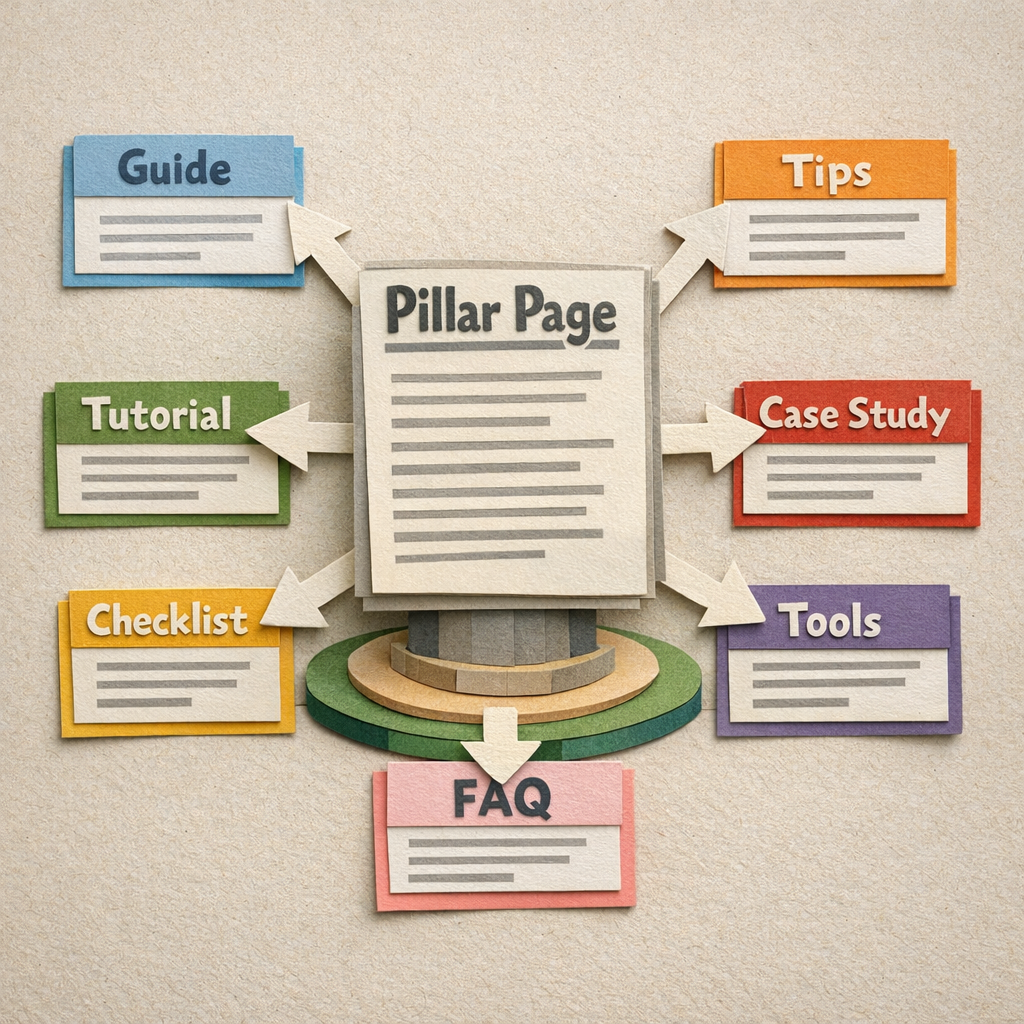
What is a topic cluster? A topic cluster is a pillar page covering a broad subject, plus a set of cluster pages that each cover one part of it, all linking to the pillar and back again. The structure tells Google which page is the authority on the head term and routes readers from the broad question to the specific answer.
The concept is simple and the execution fails on two specific things almost every time.
The first is keyword mapping, where two cluster pages end up targeting the same query and compete with each other. The second is the linking, which most guides describe as "link them together" without saying which links, in which direction, with what anchor text.
This covers both properly.
The structure, stated precisely
| Page type | Targets | Links |
|---|---|---|
| Pillar | The broad head term | Out to every cluster page |
| Cluster page | One specific sub-query | Back to pillar, sideways to 2 or 3 siblings |
| Supporting content | Long tail variants | Into the relevant cluster page |
Every cluster page links back to the pillar. That is what tells Google the pillar is the authoritative page on the broad term.
The pillar links out to every cluster page. That is what gets them crawled and what distributes authority from the page that earns links to the pages that convert.
Step 1. Pick a topic you can own completely
The test is whether you can write eight to fifteen genuinely distinct pages about it without repeating yourself. Fewer than eight and it is an article, not a cluster. More than twenty and it is two clusters.
Pick by commercial relevance, not by search volume. A cluster around what your product does earns more from a tenth of the traffic than a cluster around a popular topic adjacent to it.
One cluster done properly beats three started. The linking only works when the set is complete. Decide the order of your clusters up front and write it into your plan; the keyword clusters section of our SEO strategy plan template is built for that.
Step 2. Map keywords to pages, one to one

This is where clusters fail. List every keyword in the topic, group them by search intent rather than by wording, and assign exactly one page per group. If intent is the grouping axis, it pays to be precise about it, and what search intent means in practice sets out the four types and how to read them off a SERP.
Two keywords belong on the same page if the SERPs overlap. Search both and compare the top ten. Six or more shared results means one page, not two, regardless of how different the phrasing looks.
Write the mapping down before writing anything. A spreadsheet with keyword, assigned URL and intent prevents the cannibalisation that otherwise appears around month four, when nobody remembers what the earlier pages were targeting.
Step 3. Build the pillar to be genuinely thorough
The pillar covers the whole topic at a level that answers most of it, and hands off to cluster pages for depth. It is usually the longest page in the cluster and the one that earns the links.
It should be useful with none of the cluster pages read. A pillar that is only a table of contents ranks for nothing and earns nothing.
Do not target the pillar at a keyword a cluster page needs. Head term for the pillar, specific queries for the children.
Step 4. Write cluster pages that stand alone
Each cluster page must answer its own query completely for someone who arrived from search and has never seen the pillar. That is how most visitors will arrive.
No page should require another page to make sense. Cross-references are useful. Dependencies are not.
Step 5. Do the linking properly
The rules, specifically:
- Every cluster page links to the pillar once, high on the page, with the pillar's target keyword as anchor
- The pillar links to every cluster page, with each cluster page's target keyword as anchor
- Each cluster page links to two or three siblings where genuinely relevant, never to all of them
- Anchor text is descriptive and varied, never "click here" and never the same phrase every time
- No orphans. If a page is in the cluster, at least two other pages link to it
Sitewide navigation links do not count. A footer link to the pillar from every page is not the same signal as a contextual link inside the body.
Step 6. Publish in the right order
Pillar first, then cluster pages, then supporting content. Publishing children before the parent means they launch with nothing to link back to and get relinked later, which nobody remembers to do.
Add the pillar's outbound link on the day each cluster page goes live. Not in a batch at the end. The batch never happens.
Step 7. Watch for cannibalisation, then fix it
In Search Console, filter by query and check the pages column. Any query where two of your cluster URLs appear is a mapping error that will get worse.
The fix is a merge or a retarget, not a rewrite. Decide which page owns the query, point the other at a different intent or redirect it, and update the internal links.
The five ways clusters fail
Too small. Four pages is not a cluster and Google does not treat it as one.
Overlapping targets. Two pages, one intent, both stuck at position 11 forever.
Linking done once and never again. New pages get added without being linked in, and the structure quietly decays.
A pillar that is only an index. No standalone value, no links earned, nothing to distribute.
Abandoned halfway. Six of the planned twelve pages published, structure incomplete, none of the benefit.
Doing this on an existing site
Most sites do not start clean. They have forty posts written over three years with no structure, and the work is retrofitting rather than building.
The order that works: export every URL with its Search Console queries, group them into topics, pick your strongest page in each group as the pillar, kill or merge the duplicates, then add the links. The auditing is a day. The merging is the part people avoid and it is where the gains are.
Distribb builds the mapping and the internal links as it publishes, so a cluster stays linked as it grows rather than needing a linking pass later.
Honest limitation: it will not retrofit structure onto a large existing archive. If you have 400 unstructured posts, the audit and the merge decisions are manual work, and a tool like Link Whisper is a better fit for the retrofit than we are.
See how the SEO content platform handles clusters as they are published.
Related reading
For the architecture question at site level, see our guide to content hub SEO and worked content hub examples. For the pillar page itself, see pillar page examples.
For clusters that have already been built and can be copied, see real topic cluster examples. For the keyword mapping in step two at a scale where a spreadsheet stops helping, see keyword research automation tools.
FAQ
How many pages should a topic cluster have? Eight to fifteen for most topics. Below eight there is not enough structure for the linking to signal anything. Above twenty you are usually looking at two clusters that should each have their own pillar.
Does the pillar have to be longer than the cluster pages? Usually, but length is not the point. It has to cover the whole topic at a useful level, and covering more ground takes more words. A 6,000-word pillar padded to look authoritative helps nobody.
How long before a cluster shows results? Three to six months once the structure is complete. The pattern to expect is cluster pages ranking first and the pillar following, because the specific queries are easier than the head term.
Can I build a cluster around a keyword I already rank for? Yes, and it is the best place to start. An existing page at position 6 to 15 for a broad term is a pillar waiting for its children.